We Use CookiesWe use cookies to enhance the security, performance, functionality and for analytical and promotional activities. By continuing to browse this site you are agreeing to our privacy policy

10 Best Powerline Ethernet Adapters

From leading brands and best sellers available on the web.
By clicking on a link to a third party's website, log data is shared with that third party.

Our Top Picks

#1

Winner

TP-Link PGW2440 KIT Advanced Protocol G.hn2400 Powerline Adapter, AX1800Mbps WiFi 6 Internet Booster KIT, Extra Power Socket, 2+1 Gigabit Ethernet Ports, 8K Streaming & Gaming, Plug & Play

Rating
10.0
Chosen by1,115
Speed
Range
Pass-Through Socket
Speed
This adapter delivers speeds nearly three times faster than previous generation models, making it ideal for high-quality streaming and remote work.
Range
Powerline technology is a great solution for reaching dead spots where WiFi struggles, such as through thick walls or to detached offices and garages.
Pass-Through Socket
The plug-and-play setup is straightforward, and the pass-through power socket adds convenience without sacrificing an outlet.
Compatibility
The Windows utility works adequately, but the iOS and Mac applications are currently non-functional, limiting management options on those platforms.

The TP-Link PGW2440 KIT is a solid choice for anyone wanting to boost their home internet using powerline technology. It uses the newer G.hn standard, which tends to deliver faster and more stable speeds compared to older powerline adapters, with a rated speed up to 2400 Mbps—which is quite fast for streaming 8K video or gaming without lag. Its range of up to 300 meters (about 1,000 feet) over existing wiring means it can cover most homes effectively. The adapter includes a useful pass-through power socket, so you don't lose an outlet when you plug it in.

With one unit offering three gigabit Ethernet ports (one on one device, two on the other), it provides flexible wired connections for multiple devices, which is great if you have several gadgets that need a stable connection. It also supports Smart Roaming with compatible TP-Link routers, allowing seamless WiFi as you move through your home. On the compatibility side, it works well with other G.hn adapters and standard routers but is not compatible with older HomePlug AV adapters, so mixing different brands or standards isn’t recommended. The kit also features energy-saving modes to reduce power use when idle, which is a nice touch.

One limitation is that the G.hn adapters must be on the same electrical circuit, so performance could drop if your home’s wiring is split into separate circuits. G.hn standards generally include encryption for safe data transmission. For those seeking a plug-and-play system for improving wired and WiFi connections across a medium to large home, this adapter kit presents a convenient and capable option.

Rating
10.0
Chosen by1,115
Speed
Range
Pass-Through Socket
Speed
This adapter delivers speeds nearly three times faster than previous generation models, making it ideal for high-quality streaming and remote work.
Range
Powerline technology is a great solution for reaching dead spots where WiFi struggles, such as through thick walls or to detached offices and garages.
Pass-Through Socket
The plug-and-play setup is straightforward, and the pass-through power socket adds convenience without sacrificing an outlet.
Compatibility
The Windows utility works adequately, but the iOS and Mac applications are currently non-functional, limiting management options on those platforms.
#2

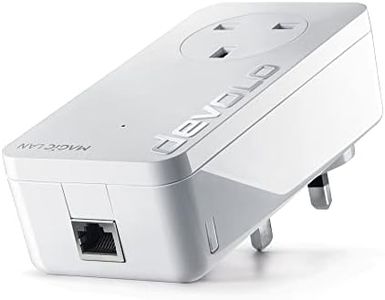
devolo Magic 2–2400 Wi-Fi 6: Powerline Starter Kit | 4k/ 8k UHD streaming | Stable home working (Up to 2400 Mbps powerline & 1800 Mbps Mesh WiFi 6, G.hn, 3x Gb LAN ports)

Rating
9.4
Speed
Range
Number of Ports
Speed
The powerline data transmission provides a reliable and stable connection, eliminating signal breakups even in challenging home layouts.
Range
The system’s mesh network is powered exclusively through the powerline connection, which ensures stability but requires all units to be on the same electrical circuit.
Number of Ports
Multiple gigabit Ethernet ports on the adapters offer excellent flexibility for wired connections, ideal for home offices or entertainment setups.
Compatibility
Compatibility is limited to the latest devolo Magic adapters using G.hn technology, which restricts expansion with older or different-brand devices.

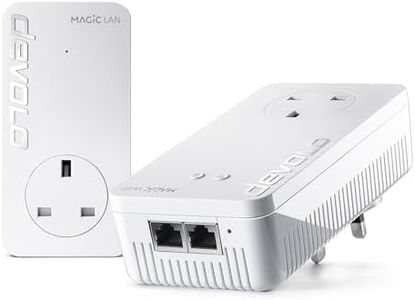
The devolo Magic 2–2400 Wi-Fi 6 Starter Kit is designed to extend your home internet to every room using your electrical wiring, which can be ideal if Wi-Fi alone struggles with distance or thick walls. It boasts very fast powerline speeds up to 2400 Mbps and supports Wi-Fi 6 with up to 1800 Mbps for wireless devices, making it suitable for heavy tasks like 4K or even 8K streaming and stable remote working.

The kit includes two adapters, one with Wi-Fi and another with LAN ports, offering three gigabit Ethernet ports for wired connections, which is great for connecting gaming consoles or smart TVs. The adapters work best across up to two floors, fitting average home sizes well. A notable limitation is that it uses the latest G.hn technology, so it only pairs with other devolo Magic adapters and not older dLAN models, which might affect users wanting to expand an existing different-brand setup.

This product supports common security standards, helping keep your network safe. It represents a strong choice for reliable, high-speed internet coverage through your home’s electrical system, especially for users needing both wired and Wi-Fi connections with the latest standards, while keeping in mind compatibility considerations if you already own other powerline devices.

Rating
9.4
Speed
Range
Number of Ports
Speed
The powerline data transmission provides a reliable and stable connection, eliminating signal breakups even in challenging home layouts.
Range
The system’s mesh network is powered exclusively through the powerline connection, which ensures stability but requires all units to be on the same electrical circuit.
Number of Ports
Multiple gigabit Ethernet ports on the adapters offer excellent flexibility for wired connections, ideal for home offices or entertainment setups.
Compatibility
Compatibility is limited to the latest devolo Magic adapters using G.hn technology, which restricts expansion with older or different-brand devices.
#3

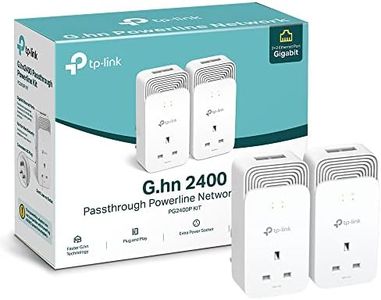
TP-Link PG2400PKIT Wired Passthrough G.hn 2400 Powerline Adapter, Faster G.hn Technology, Powerline Network Adapters with 2+2 Gigabit Ethernet Ports, No Configuration Required, Plug and Play,Pack of 2

Rating
8.8
Speed
Range
Number of Ports
Speed
The speed improvement over older standards is remarkable, delivering nearly triple the performance and enabling smooth high-quality streaming and remote work.
Range
The powerline solution effectively reaches dead zones where Wi-Fi struggles, such as through thick walls or detached buildings like garages.
Number of Ports
The dual Gigabit Ethernet ports on each adapter allow multiple devices to connect simultaneously with fast, reliable wired connections.
Pass-Through Socket
Setup is straightforward and truly plug-and-play, with the added pass-through power outlet allowing continued use of the electrical socket.
Compatibility
Compatibility requires both adapters to be on the same electrical circuit, and it does not support older HomePlug AV or AV2 devices.

The TP-Link PG2400PKIT powerline adapter uses advanced G.hn technology to deliver fast and stable wired internet speeds, making it a strong choice for users wanting reliable connections for activities like 8K streaming and gaming. It supports high-speed data transfer over existing electrical wiring up to about 300 meters, which covers a typical home’s size well without needing extra cables.

A standout feature is its two adapters, each offering 2 Gigabit Ethernet ports, allowing multiple devices to be connected simultaneously with fast wired connections. The pass-through power socket means you won’t lose an outlet since you can still plug in other devices directly into the adapter. It also saves energy by automatically reducing power when not in use, helping to lower electricity costs.

Compatibility is straightforward with all routers and other G.hn-based TP-Link adapters; however, it does not work with older HomePlug AV or AV2 models, and both adapters must be on the same electrical circuit to function properly. As a wired solution, it does not provide Wi-Fi, making it best suited for users who want strong, reliable wired connections rather than wireless coverage. The product is well-suited for those needing fast, multi-port wired networking across a home, especially where Wi-Fi alone is insufficient.

Rating
8.8
Speed
Range
Number of Ports
Speed
The speed improvement over older standards is remarkable, delivering nearly triple the performance and enabling smooth high-quality streaming and remote work.
Range
The powerline solution effectively reaches dead zones where Wi-Fi struggles, such as through thick walls or detached buildings like garages.
Number of Ports
The dual Gigabit Ethernet ports on each adapter allow multiple devices to connect simultaneously with fast, reliable wired connections.
Pass-Through Socket
Setup is straightforward and truly plug-and-play, with the added pass-through power outlet allowing continued use of the electrical socket.
Compatibility
Compatibility requires both adapters to be on the same electrical circuit, and it does not support older HomePlug AV or AV2 devices.

Buying Guide for the Best Powerline Ethernet Adapters

Powerline Ethernet adapters are a convenient solution for extending your home network using your existing electrical wiring. They are particularly useful in situations where Wi-Fi signals are weak or unreliable, or when you want to connect devices that require a stable wired connection without running long Ethernet cables through your home. When choosing a powerline adapter, it's important to consider several key specifications to ensure you get the best performance and compatibility for your needs.
SpeedSpeed refers to the maximum data transfer rate that the powerline adapter can support, typically measured in megabits per second (Mbps) or gigabits per second (Gbps). This is important because it determines how fast data can be transmitted over your network, affecting activities like streaming, gaming, and file transfers. Powerline adapters are often categorized by their speed, such as 500 Mbps, 1000 Mbps, or 2000 Mbps. If you have high-speed internet or plan to use the network for data-intensive tasks, opt for a higher speed adapter. For basic internet browsing and streaming, a lower speed may suffice.
RangeRange indicates how far the powerline signal can travel through your home's electrical wiring. This is crucial for ensuring that the adapter can effectively connect devices located in different rooms or floors. The range can be affected by the quality of your electrical wiring and the distance between outlets. Generally, powerline adapters can cover distances up to 300 meters, but performance may degrade over longer distances. If your home is large or has complex wiring, consider adapters with a longer range or additional features like Wi-Fi extenders.
Number of PortsThe number of Ethernet ports on a powerline adapter determines how many devices you can connect directly to it. This is important if you have multiple devices that require a wired connection, such as gaming consoles, smart TVs, or desktop computers. Adapters typically come with one to four ports. If you need to connect several devices, look for an adapter with more ports or consider using a network switch to expand connectivity.
Pass-Through SocketA pass-through socket is a feature that allows you to plug other electrical devices into the powerline adapter itself, effectively preserving the use of the wall outlet. This is important in homes where power outlets are limited, as it prevents the adapter from occupying a valuable socket. If you have limited outlets or need to maintain access to them, consider choosing an adapter with a pass-through socket.
CompatibilityCompatibility refers to the ability of the powerline adapter to work with other devices and standards, such as HomePlug AV or AV2. This is important to ensure that your adapter can integrate seamlessly with your existing network setup. Most modern adapters are backward compatible with older standards, but it's always a good idea to check compatibility if you have existing powerline adapters or specific network requirements. Choose an adapter that supports the latest standards for better performance and future-proofing.
SecuritySecurity features in powerline adapters protect your network from unauthorized access. This is important to ensure that your data remains private and secure. Most adapters come with encryption options, such as 128-bit AES encryption, which can be activated with a simple button press. If security is a concern, look for adapters with robust encryption features and ensure they are easy to set up and manage.