We Use CookiesWe use cookies to enhance the security, performance, functionality and for analytical and promotional activities. By continuing to browse this site you are agreeing to our privacy policy

10 Best Ink Tank Printers

From leading brands and best sellers available on the web.
By clicking on a link to a third party's website, log data is shared with that third party.

Our Top Picks

#1

Winner

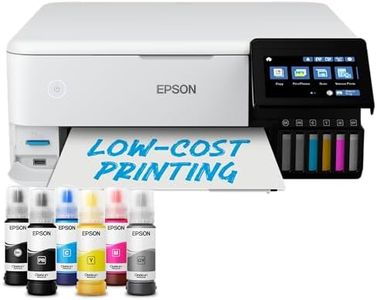
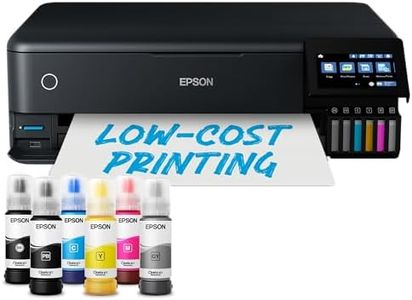
Epson EcoTank ET-8550 A3+ Wi-Fi Ink Tank Photo Printer

Rating
10.0
Chosen by1,427
Print Quality
Ink Tank Capacity
Cost Per Page
Print Quality
The printer delivers excellent photo quality, with vibrant colors especially when using high-quality paper.
Ink Tank Capacity
The ink tank design is praised for its ease of use, allowing for straightforward refills without spillage.
Cost Per Page
Ink efficiency is a standout feature, making it economical for high-volume printing, particularly for A3 and A4 photos.

The Epson EcoTank ET-8550 A3+ Wi-Fi Ink Tank Photo Printer offers impressive print quality with its 6-colour ink system, which includes new grey ink for enhanced black and white photos. It supports high-resolution photo printing up to A3+ size and produces sharp text with its pigment black ink. This printer is highly economical, allowing you to print up to 2,300 high-quality photos with one set of ink bottles, reducing the need for frequent refills and lowering the cost per page.

The user-friendly design of the bottles and tanks ensures a mess-free refill process. Connectivity options are robust, including full Wi-Fi, Wi-Fi Direct, Ethernet, SD card, and USB flash drive support, providing seamless integration with various devices. The 10.9cm colour touchscreen adds to the ease of use, making operation straightforward.

The ET-8550 is versatile, handling different media types, including CDs/DVDs, craft papers, and thick media up to 1.3mm. It also supports borderless printing and auto-duplex for double-sided printing. Additionally, the Epson Smart Panel app allows you to control the printer from your smartphone or tablet, enhancing convenience. The printer's weight at 11.1 kg makes it relatively bulky, which might be a consideration for smaller spaces. The print speeds are moderate, with 16 ppm for monochrome and 12 ppm for colour, which may not be the fastest in its class but are adequate for most home and small office needs. The initial cost might be higher than other models, but the savings on ink in the long term can justify the investment.

Rating
10.0
Chosen by1,427
Print Quality
Ink Tank Capacity
Cost Per Page
Print Quality
The printer delivers excellent photo quality, with vibrant colors especially when using high-quality paper.
Ink Tank Capacity
The ink tank design is praised for its ease of use, allowing for straightforward refills without spillage.
Cost Per Page
Ink efficiency is a standout feature, making it economical for high-volume printing, particularly for A3 and A4 photos.
#2

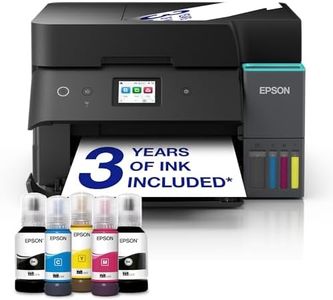
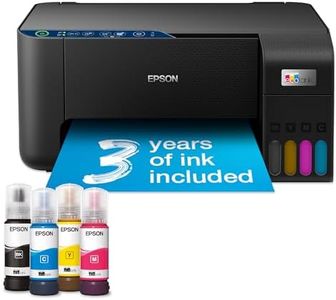
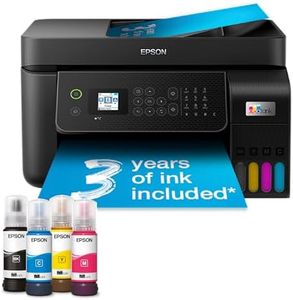
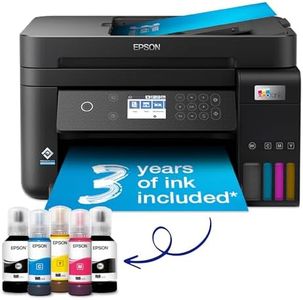
Epson EcoTank ET-3850 A4 Multifunction Air Print Wi-Fi Ink Tank Printer with Duplex and ADF, Up To 3 Years Of Ink Included

Rating
9.4
Print Quality
Connectivity Options
Ink Tank Capacity
Print Quality
Print quality is generally good with sharp documents, though colours can sometimes appear a bit washed out and blacks not as deep as expected.
Connectivity Options
Setting up the printer can be time-consuming and occasionally frustrating, especially when configuring wireless connections and advanced features like Epson Connect.
Ink Tank Capacity
The visible ink tanks and ability to refill before running out make ink management effortless and far more cost-effective than cartridge-based printers.
Cost Per Page
Ink costs are significantly lower than traditional cartridges, with genuine Epson bottles providing a large volume that lasts much longer.
Additional Features
The automatic document feeder and duplex printing streamline multi-page tasks, adding convenience for home or small office use.

The Epson EcoTank ET-3850 is a solid choice for home or small office users looking for an affordable, low-maintenance ink tank printer. It delivers good print quality, especially with its high colour depth and resolution, making documents and photos look sharp. The print speed is decent, offering up to 33 pages per minute in black and 20 in colour, which should handle everyday printing tasks without much delay. Connectivity is straightforward with Wi-Fi and Wi-Fi Direct, making it easy to print from smartphones, tablets, or laptops without cables. The standout feature is its ultra-high capacity ink tanks, which come with enough ink to print for up to three years, dramatically lowering the cost per page compared to cartridge printers. This is great for users who want to avoid frequent ink replacements and save money over time.

The printer also supports duplex (double-sided) printing and has a 30-page automatic document feeder, speeding up multi-page tasks like scanning or copying. The 250-sheet paper tray helps reduce the need for constant refills. On the downside, its maximum black print resolution is 600 dpi, which is lower than some rivals and might affect the sharpness of fine text or detailed images. Also, while the printer has a colour LCD screen, it is relatively small, which might make navigation less convenient. The printer is moderately heavy at 6.7 kg, so it’s less ideal if you need something very portable.

For users who prioritize low running costs, good connectivity, and features like duplex printing and an automatic feeder, the EcoTank ET-3850 represents a practical and economical ink tank printer choice.

Rating
9.4
Print Quality
Connectivity Options
Ink Tank Capacity
Print Quality
Print quality is generally good with sharp documents, though colours can sometimes appear a bit washed out and blacks not as deep as expected.
Connectivity Options
Setting up the printer can be time-consuming and occasionally frustrating, especially when configuring wireless connections and advanced features like Epson Connect.
Ink Tank Capacity
The visible ink tanks and ability to refill before running out make ink management effortless and far more cost-effective than cartridge-based printers.
Cost Per Page
Ink costs are significantly lower than traditional cartridges, with genuine Epson bottles providing a large volume that lasts much longer.
Additional Features
The automatic document feeder and duplex printing streamline multi-page tasks, adding convenience for home or small office use.
#3

Epson EcoTank ET-8500 A4 Wi-Fi Ink Tank Photo Printer

Rating
8.5
Print Quality
Connectivity Options
Ink Tank Capacity
Print Quality
The ET-8500 delivers stunning photo prints that rival professional quality, making it unnecessary to order prints online.
Connectivity Options
Setup requires attention, including removing numerous tapes, but once completed, the printer integrates well with multiple devices via USB, Wi-Fi, and Ethernet.
Ink Tank Capacity
Ink tank system is praised for its ease of use, with bottles designed to prevent spillage and ensure correct filling.
Cost Per Page
Users appreciate the economical printing, noting that ink lasts significantly longer compared to traditional cartridges, although the actual number of prints may vary depending on paper size and print type.
Additional Features
The printer's ability to handle a variety of paper types, including A3 and specialty media, is highly valued by photographers and artists.

The Epson EcoTank ET-8500 is a versatile ink-tank printer designed to deliver high-quality print results, particularly for photo enthusiasts. It features a 6-colour ink system, including a new grey ink, which enhances black and white photo printing and ensures vibrant, long-lasting colour prints. This makes it an attractive option for those who prioritize print quality, especially in photography. With its refillable ink tanks, the ET-8500 is economical, offering the ability to print up to 2,300 photos with a single set of ink bottles, which significantly reduces the cost per page compared to traditional cartridges.

In terms of speed, the printer's maximum output is 16 pages per minute for monochrome and 12 pages per minute for colour, which is decent but may not satisfy users with high-volume or rapid printing needs. The ET-8500 excels in connectivity options, supporting Wi-Fi, Wi-Fi Direct, and Ethernet, along with direct printing from SD cards and USB flash drives through a user-friendly 10.9cm colour touchscreen. This modern connectivity flexibility makes it easy to integrate into various setups, from home to small office environments.

For creative users, the printer's ability to handle specialty media, including direct printing on CDs/DVDs and thick media up to 1.3 mm, adds to its appeal. It also employs Epson's heat-free technology for efficient, consistent operation with reduced energy consumption. At 11.1 kg, the printer is somewhat bulky and might not fit smaller spaces easily. While it offers excellent features for printing photos and creative projects, its speed might not be ideal for those needing rapid document output. The printer’s upfront cost might also be a consideration, though it balances out with lower long-term ink expenses. The Epson Smart Panel App offers additional convenience for device control and creativity, though users seeking simple, straightforward document printing might find it more than they need. The ET-8500 is ideal for those looking for high-quality prints with a focus on photos and creative projects.

Rating
8.5
Print Quality
Connectivity Options
Ink Tank Capacity
Print Quality
The ET-8500 delivers stunning photo prints that rival professional quality, making it unnecessary to order prints online.
Connectivity Options
Setup requires attention, including removing numerous tapes, but once completed, the printer integrates well with multiple devices via USB, Wi-Fi, and Ethernet.
Ink Tank Capacity
Ink tank system is praised for its ease of use, with bottles designed to prevent spillage and ensure correct filling.
Cost Per Page
Users appreciate the economical printing, noting that ink lasts significantly longer compared to traditional cartridges, although the actual number of prints may vary depending on paper size and print type.
Additional Features
The printer's ability to handle a variety of paper types, including A3 and specialty media, is highly valued by photographers and artists.

Buying Guide for the Best Ink Tank Printers

Ink-tank printers are a great choice for those who need to print frequently and want to save on ink costs in the long run. Unlike traditional cartridge-based printers, ink-tank printers come with refillable ink tanks that can hold a larger volume of ink, making them more economical and environmentally friendly. When choosing an ink-tank printer, it's important to consider your specific printing needs, such as the volume of printing, the type of documents or images you print, and any additional features you might require. Understanding the key specifications will help you make an informed decision.
Print QualityPrint quality is determined by the printer's resolution, measured in dots per inch (DPI). Higher DPI means better print quality, which is important for printing detailed images or professional documents. If you primarily print text documents, a lower DPI might suffice, but for high-quality photo printing, look for a printer with a higher DPI. Consider what you print most often to decide the level of print quality you need.
Print SpeedPrint speed is measured in pages per minute (PPM) and indicates how fast a printer can produce documents. This is crucial if you need to print large volumes quickly. Printers with higher PPM are suitable for office environments or users who print frequently. If you print occasionally or in small volumes, a lower PPM might be acceptable. Assess your typical printing volume to determine the appropriate print speed.
Connectivity OptionsConnectivity options refer to how the printer connects to your devices. Common options include USB, Wi-Fi, and Ethernet. Wi-Fi connectivity allows for wireless printing from multiple devices, which is convenient for home or office use. USB connections are straightforward but limit you to printing from one device at a time. Consider your setup and how you prefer to print when choosing connectivity options.
Ink Tank CapacityInk tank capacity indicates how much ink the printer can hold, affecting how often you need to refill. Larger tanks are beneficial for high-volume printing as they require less frequent refilling, saving time and effort. If you print a lot, look for a printer with larger ink tanks. For occasional printing, smaller tanks might be sufficient. Think about your printing habits to decide on the right capacity.
Cost Per PageCost per page is an estimate of how much it costs to print a single page, factoring in the price of ink and paper. This is important for budgeting and understanding the long-term costs of owning a printer. Ink-tank printers generally have a lower cost per page compared to cartridge printers. If you print frequently, a lower cost per page can lead to significant savings. Consider your printing frequency to evaluate the cost-effectiveness.
Additional FeaturesAdditional features can include scanning, copying, duplex printing, and mobile printing capabilities. These features add versatility and convenience, especially in a home office or business setting. If you need to perform multiple functions, look for a printer with these capabilities. If your needs are basic, a simpler model might suffice. Identify which features are essential for your use case to make the right choice.