We Use CookiesWe use cookies to enhance the security, performance, functionality and for analytical and promotional activities. By continuing to browse this site you are agreeing to our privacy policy

10 Best Inkjet Printers

From leading brands and best sellers available on the web.
By clicking on a link to a third party's website, log data is shared with that third party.

Our Top Picks

#1

Winner

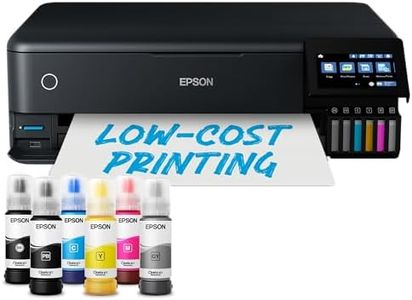
Epson EcoTank ET-8550 A3+ Wi-Fi Ink Tank Photo Printer

Rating
10.0
Chosen by1,397
Print Quality
Connectivity Options
Ink Cartridge Cost and Yield
Print Quality
The Epson EcoTank ET-8550 is perfect for photography enthusiasts, offering excellent color rendition and high-quality photo prints, especially when used with Photoshop's color profiles.
Connectivity Options
Setting up the printer requires careful removal of transport tapes and following the setup instructions closely, but once done, it's easy to use and connect via USB, Wi-Fi, or Ethernet.
Ink Cartridge Cost and Yield
Despite Epson's claim of printing 2300 photos per ink set, users have found this number to be based on smaller print sizes, with full A4 and A3 prints yielding fewer but still economical results.
Additional Features
This printer does it all—copying, scanning, and printing text documents with ease, making it a versatile choice for both photo and office printing needs.

The Epson EcoTank ET-8550 A3+ Wi-Fi Ink Tank Photo Printer stands out with its 6-colour ink system, including a grey ink for superior black and white photos and a pigment black ink for sharp text on plain papers. This makes it ideal for users wanting high-quality photo prints up to A3+ size. The printer is highly economical, capable of printing up to 2,300 photos from one set of ink bottles, which is convenient and cost-effective over time. The ink bottles are easy to replace, minimizing hassle and mess during refills.

Connectivity is a strong point with options like full Wi-Fi, Wi-Fi Direct, and Ethernet, along with support for printing from SD cards and USB flash drives. The 10.9cm color touchscreen adds to its user-friendly interface. Artistic media compatibility is another plus, offering versatile paper handling abilities, including an A3+ rear tray for specialty media and a straight paper feed for thicker materials up to 1.3 mm thick. Additional features include wireless capabilities, auto-duplex printing, and borderless printing, enhancing its functionality.

However, there are some drawbacks. The print speeds, at 16 ppm for monochrome and 12 ppm for color, are moderate and might not suit users with high-volume printing needs. The maximum paper input capacity is 50 sheets, which could be limiting for larger print jobs. Also, at 11.1 kilograms, it's relatively heavy, potentially challenging to move or reposition. Despite these considerations, the Epson EcoTank ET-8550 is an excellent choice for home users and creatives who prioritize high-quality photo printing and economical ink usage.

Rating
10.0
Chosen by1,397
Print Quality
Connectivity Options
Ink Cartridge Cost and Yield
Print Quality
The Epson EcoTank ET-8550 is perfect for photography enthusiasts, offering excellent color rendition and high-quality photo prints, especially when used with Photoshop's color profiles.
Connectivity Options
Setting up the printer requires careful removal of transport tapes and following the setup instructions closely, but once done, it's easy to use and connect via USB, Wi-Fi, or Ethernet.
Ink Cartridge Cost and Yield
Despite Epson's claim of printing 2300 photos per ink set, users have found this number to be based on smaller print sizes, with full A4 and A3 prints yielding fewer but still economical results.
Additional Features
This printer does it all—copying, scanning, and printing text documents with ease, making it a versatile choice for both photo and office printing needs.
#2

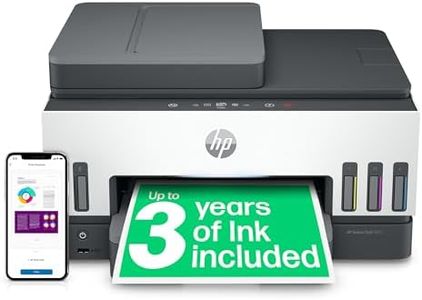
HP Smart Tank 7605 All in One Printer | Perfect for Home | Colour | Wireless, Ethernet | Print, Scan, Copy, Fax | Refillable, Includes up to 3 Years of Ink | 2-Sided Printing | Document Feeder

Rating
10.0
Print Quality
Connectivity Options
Ink Cartridge Cost and Yield
Print Quality
Quality prints are delivered quickly, enhancing the overall user experience.
Connectivity Options
Setting up the printer is straightforward, with seamless connectivity to PCs and mobile devices.
Ink Cartridge Cost and Yield
The ink tanks offer a significant advantage over traditional cartridges, providing cost-effective and long-lasting printing.
Paper Handling
The printer's large paper tray and double-sided printing capabilities add to its convenience.

The HP Smart Tank 7605 All-in-One Wireless Inkjet Printer is a versatile device designed for busy families who need to print high volumes of documents. One of its standout strengths is its print quality, with high resolution for both black and white (1200 x 1200 dpi) and color prints (4800 x 1200 dpi), ensuring sharp text and vibrant images. The printer supports various tasks such as printing, copying, scanning, and faxing, which adds to its multifunctionality.

Additionally, the automatic 2-sided printing and 35-page automatic document feeder enhance productivity and efficiency for users handling multiple-page documents. The printer’s speed is also decent, with up to 23 pages per minute (ppm) for monochrome and 22 ppm for color prints, suitable for most home and small office needs. Connectivity options are robust, including wireless and mobile printing capabilities, which allow for easy and flexible access from multiple devices.

The ink system is another highlight, with a spill-free refill system that promises up to three years of ink supply right out of the box, reducing the hassle and cost of frequent cartridge changes. However, one weakness is the relatively slower print speed for color documents when compared to some high-end models, which might be a minor inconvenience for users needing faster color printing. Additionally, the device's weight (7.7 kilograms) might be a concern for those looking for a more portable option. The HP Smart Tank 7605 provides excellent value for families needing a reliable and cost-effective printer with high-volume capabilities and modern connectivity features, despite minor drawbacks in color print speed and portability.

Rating
10.0
Print Quality
Connectivity Options
Ink Cartridge Cost and Yield
Print Quality
Quality prints are delivered quickly, enhancing the overall user experience.
Connectivity Options
Setting up the printer is straightforward, with seamless connectivity to PCs and mobile devices.
Ink Cartridge Cost and Yield
The ink tanks offer a significant advantage over traditional cartridges, providing cost-effective and long-lasting printing.
Paper Handling
The printer's large paper tray and double-sided printing capabilities add to its convenience.
#3

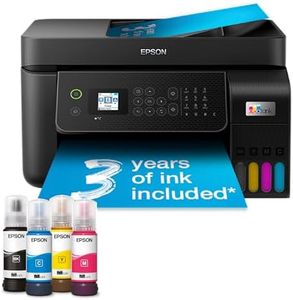
Epson EcoTank ET-4800 A4 Multifunction Wi-Fi Ink Tank Printer, With Up To 3 Years Of Ink Included

Rating
9.1
Ink Cartridge Cost and Yield
Connectivity Options
Print Quality
Ink Cartridge Cost and Yield
The huge refillable ink tanks provide up to 72 cartridge equivalents, making ink costs significantly lower and reducing the hassle of frequent replacements.
Connectivity Options
Setup is straightforward and guided by a dedicated smartphone app that simplifies installation and connection, even on Windows 11.
Print Quality
Print quality for office documents is very good, producing sharp, professional results that users feel confident sharing.
Additional Features
Double-sided printing and the automatic document feeder add practical convenience for home office tasks.
Print Speed
Print speeds are decent for an inkjet but may feel slow for busy office environments where speed is critical.

The Epson EcoTank ET-4800 is a great choice for home users and small offices looking to save money on ink and enjoy hassle-free printing. Instead of traditional cartridges, it uses large refillable ink tanks that come with up to three years’ worth of ink included. This means you can print thousands of pages without worrying about running out or buying replacements often, which makes it very economical. Print quality is excellent, especially for colour documents and photos, thanks to a high print resolution of up to 4800 x 1200 dpi. The print speed is decent for an inkjet, with up to 33 pages per minute for black and 15 ppm for colour, so it handles everyday tasks without too much delay.

Connectivity options are modern and flexible, featuring Wi-Fi, Wi-Fi Direct, and Ethernet, allowing printing from laptops, smartphones, and tablets easily. It also has a handy 30-page automatic document feeder and supports double-sided printing, which is useful for multi-page documents. The compact design fits well in smaller spaces, and the Epson Smart Panel app makes managing printing, scanning, and copying straightforward from a mobile device.

On the downside, although print speeds are good for an inkjet, they won't match faster laser printers, and the printer weighs 5 kg, so it’s not the lightest if you need portability. The maximum paper tray holds 100 sheets, which is enough for light to moderate use but may require frequent refills in busier offices. The heat-free Micro Piezo technology reduces energy use and maintenance but might not appeal to those needing very high-volume printing. This printer suits users who want affordable, high-quality colour prints without the mess of cartridges and value wireless convenience.

Rating
9.1
Ink Cartridge Cost and Yield
Connectivity Options
Print Quality
Ink Cartridge Cost and Yield
The huge refillable ink tanks provide up to 72 cartridge equivalents, making ink costs significantly lower and reducing the hassle of frequent replacements.
Connectivity Options
Setup is straightforward and guided by a dedicated smartphone app that simplifies installation and connection, even on Windows 11.
Print Quality
Print quality for office documents is very good, producing sharp, professional results that users feel confident sharing.
Additional Features
Double-sided printing and the automatic document feeder add practical convenience for home office tasks.
Print Speed
Print speeds are decent for an inkjet but may feel slow for busy office environments where speed is critical.

Buying Guide for the Best Inkjet Printers

Choosing the right inkjet printer involves understanding your specific needs and how different features of the printer can meet those needs. Inkjet printers are versatile and can handle a variety of tasks, from printing documents to producing high-quality photos. When selecting an inkjet printer, consider what you will primarily use it for, how often you will use it, and any additional features that might be beneficial for your tasks. This will help you narrow down the options and find a printer that best suits your requirements.
Print QualityPrint quality is determined by the printer's resolution, measured in dots per inch (DPI). Higher DPI means better print quality, which is important for printing detailed images and photos. If you need a printer for high-quality photo prints, look for a model with a higher DPI, typically 1200 DPI or more. For general document printing, a lower DPI, such as 600 DPI, may suffice. Consider what you will be printing most often to decide the level of print quality you need.
Print SpeedPrint speed is measured in pages per minute (PPM) and indicates how quickly a printer can produce pages. This is important if you need to print large volumes of documents quickly. Printers with higher PPM are suitable for office environments where speed is crucial. For home use, where speed might not be as critical, a lower PPM might be acceptable. Assess how often and how much you print to determine the appropriate print speed for your needs.
Connectivity OptionsConnectivity options refer to how the printer connects to your devices. Common options include USB, Wi-Fi, and Ethernet. Wi-Fi connectivity allows for wireless printing from multiple devices, which is convenient for home or office use. USB connections are straightforward and reliable for single-device use. Ethernet is useful for networked office environments. Consider your setup and how you prefer to connect your devices to choose the right connectivity options.
Ink Cartridge Cost and YieldInk cartridge cost and yield refer to the price of replacement cartridges and how many pages they can print. This is important for understanding the long-term cost of owning a printer. High-yield cartridges print more pages and can be more cost-effective over time. If you print frequently, look for printers with affordable and high-yield cartridges. For infrequent printing, standard cartridges might be sufficient. Consider your printing volume to choose the right balance between cost and yield.
Paper HandlingPaper handling refers to the types and sizes of paper a printer can accommodate, as well as the capacity of its paper tray. This is important if you need to print on different media types, such as envelopes, labels, or photo paper. A printer with multiple paper trays or adjustable trays can offer more flexibility. If you print a lot, a larger paper capacity can reduce the frequency of refilling the tray. Consider the types of documents you print to determine the necessary paper handling features.
Additional FeaturesAdditional features can include scanning, copying, and faxing capabilities, as well as duplex printing (printing on both sides of the paper). These features can add convenience and functionality, especially in a home office or small business setting. If you need to perform multiple tasks with one device, look for a multifunction printer. Duplex printing can save paper and is useful for creating professional-looking documents. Consider what extra functions you might need to choose a printer with the right additional features.