We Use CookiesWe use cookies to enhance the security, performance, functionality and for analytical and promotional activities. By continuing to browse this site you are agreeing to our privacy policy

10 Best Compact Printers

From leading brands and best sellers available on the web.
Our Top Picks

#1

Winner

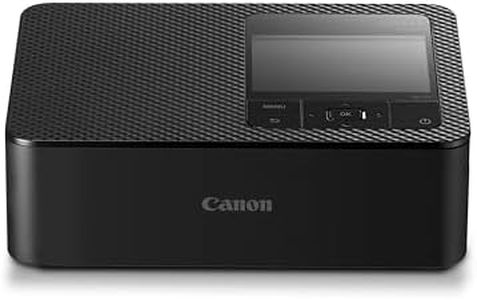
Canon SELPHY CP1500 Compact Photo Printer – Wireless Printing, Long-Lasting Prints, USB-C & SD Card Connectivity – Ideal for Scrapbooks & Photo Albums, Black GB

Rating
10.0
Chosen by1,174
Print Technology
Size and Portability
Connectivity Options
Print Technology
Produces vibrant, high-quality prints that are perfect for family photos, kids, and pets.
Size and Portability
Easy to use, lightweight, and compact, making it ideal for casual photo printing on the go.
Connectivity Options
Instant printing from mobile devices is seamless and convenient, with quick connectivity and easy setup.
Paper Handling
Maintaining a full paper tray helps avoid print defects like lines on the photos.

The Canon SELPHY CP1500 is a compact photo printer designed for those who want quick, high-quality prints without the bulk of a traditional printer. It uses dye-sublimation technology, which produces vibrant, long-lasting photos resistant to water, scratches, and fingerprints—great for scrapbooks or photo albums. You can expect postcard-sized photos in about 41 seconds, which is reasonably fast for a portable photo printer. The print resolution is 300 dpi, providing clear and sharp images, though it’s not suitable for very detailed or professional photo enlargements.

Connectivity options include USB-C, Wi-Fi, and SD card slots, making it easy to print directly from smartphones, tablets, or laptops. The included SELPHY app adds fun features like filters and stickers, which is ideal for casual users who enjoy personalising their prints. Paper handling is straightforward but limited; it only prints one sheet at a time and supports various small photo sizes, which is perfect for creative projects but not for bulk printing. Weighing just 850 grams and measuring roughly 18 x 13 x 6 cm, it’s truly portable and fits nicely in small spaces, making it convenient for parties or travel.

On the downside, the print speed for black and white images is quite slow, and it doesn’t support double-sided printing. Also, it’s tailored mostly for photo printing, so it won't replace a regular document printer. Those seeking a stylish, easy-to-use printer that produces durable, vibrant photos on the go will find the SELPHY CP1500 to be a strong choice. However, if faster printing or more versatility is needed, other options might be more suitable.

Rating
10.0
Chosen by1,174
Print Technology
Size and Portability
Connectivity Options
Print Technology
Produces vibrant, high-quality prints that are perfect for family photos, kids, and pets.
Size and Portability
Easy to use, lightweight, and compact, making it ideal for casual photo printing on the go.
Connectivity Options
Instant printing from mobile devices is seamless and convenient, with quick connectivity and easy setup.
Paper Handling
Maintaining a full paper tray helps avoid print defects like lines on the photos.
#2

KODAK Mini 2 Retro 4PASS Portable Photo Printer (2.1x3.4 inches) Initial 8 Sheets + 60 Sheets Pack Bundle, White

Rating
9.4
Size and Portability
Print Speed
Size and Portability
Its compact and portable design makes it perfect to carry everywhere, ideal for parties and trips.
Print Speed
Print speed is impressively quick, producing photos faster than expected for a portable device.

The Kodak Mini 2 Retro is a small, lightweight portable photo printer ideal for quickly printing 2.1x3.4 inch photos on the go. It uses 4PASS inkjet technology to print photos in multiple color layers with a laminated finish, making the prints fingerprint-proof and waterproof, which helps preserve memories. Users can choose between bordered photos for writing notes or borderless ones for a larger picture look.

Connectivity is simple via Bluetooth, allowing direct printing from your smartphone using Kodak’s app, which offers fun editing features like filters and frames. The print speed is relatively slow, producing about one photo per minute, and the resolution is standard at 300 dpi, resulting in decent but not highly detailed photos. The printer can handle up to 60 sheets at once, making it suitable for casual use rather than heavy printing.

Its compact size and light weight make it easy to carry around, perfect for parties or trips. As a budget-friendly option for instant home photo printing, the slow speed and limited print size make it best suited for casual photo enthusiasts rather than those requiring large or fast prints.

Rating
9.4
Size and Portability
Print Speed
Size and Portability
Its compact and portable design makes it perfect to carry everywhere, ideal for parties and trips.
Print Speed
Print speed is impressively quick, producing photos faster than expected for a portable device.
#3

HP DeskJet 2820e All in One Printer | Perfect for Home | Colour | Wireless | Print, Scan & Copy | 3 Months of free Instant Ink | Easy Setup & Reliable Wi-Fi| Cement

Rating
9.1
Print Resolution
Print Speed
Connectivity Options
Print Resolution
The printer delivers crisp, clear prints with reliable first-time accuracy, making it ideal for casual home and light work use.
Print Speed
Quiet mode significantly reduces noise during printing, although it slightly slows down the print speed.
Connectivity Options
Wireless connectivity via Wi-Fi and app integration allows printing from anywhere with an internet connection, enhancing convenience.
Paper Handling
The compact, minimalist design fits well in home environments and supports easy scanning and copying directly from the device or app.
Size and Portability
The compact, minimalist design fits well in home environments and supports easy scanning and copying directly from the device or app.
Print Technology
Ink subscription services simplify ink management but lock users into HP cartridges for the printer's lifetime.

The HP DeskJet 2820e is a compact all-in-one inkjet printer designed mainly for basic home printing tasks like recipes, labels, and schoolwork. It supports printing, scanning, and copying, making it a versatile choice for everyday use. The print speed is moderate, with up to 7.5 pages per minute in black and white and 5.5 pages per minute in color, which is sufficient for casual users but may feel slow for heavier printing needs. Print resolution is decent, producing sharp color prints thanks to its high dpi, which is good for photos and documents needing clear detail.

Connectivity is a strong point, offering wireless Wi-Fi and Bluetooth, allowing easy printing from smartphones and other devices without cables. The included HP print app simplifies setup and use, helping even beginners get started quickly. Paper handling is basic with a 50-sheet capacity and support for standard A4 size and labels, suitable for light workloads but not high-volume tasks. The printer is fairly compact and lightweight for portability around the home, though not pocket-sized.

A valuable feature is the 3 months of free Instant Ink, a subscription service that delivers ink before you run out, potentially saving money and hassle. The printer is also made with recycled plastic, showing some eco-friendly design. However, it lacks duplex (double-sided) printing, which could be a drawback if you want to reduce paper use. This printer is well-suited for users seeking an easy-to-use, wireless, compact device for light home duties, delivering solid print quality and convenience but not intended for fast, high-volume, or professional printing needs.

Rating
9.1
Print Resolution
Print Speed
Connectivity Options
Print Resolution
The printer delivers crisp, clear prints with reliable first-time accuracy, making it ideal for casual home and light work use.
Print Speed
Quiet mode significantly reduces noise during printing, although it slightly slows down the print speed.
Connectivity Options
Wireless connectivity via Wi-Fi and app integration allows printing from anywhere with an internet connection, enhancing convenience.
Paper Handling
The compact, minimalist design fits well in home environments and supports easy scanning and copying directly from the device or app.
Size and Portability
The compact, minimalist design fits well in home environments and supports easy scanning and copying directly from the device or app.
Print Technology
Ink subscription services simplify ink management but lock users into HP cartridges for the printer's lifetime.

Buying Guide for the Best Compact Printers

When choosing a compact printer, it's important to consider your specific needs and how the printer will fit into your space and lifestyle. Compact printers are designed to save space while still providing essential printing functions. They are ideal for home offices, small businesses, or personal use where space is limited. To find the best compact printer for you, consider the key specifications that will impact your printing experience.
Print TechnologyPrint technology refers to the method a printer uses to produce text and images on paper. The most common types are inkjet and laser. Inkjet printers are versatile and can handle a variety of media types, making them great for printing photos and color documents. Laser printers, on the other hand, are typically faster and more cost-effective for high-volume black-and-white printing. If you need vibrant color prints, go for an inkjet. If you print mostly text documents, a laser printer might be more suitable.
Print SpeedPrint speed is measured in pages per minute (PPM) and indicates how quickly a printer can produce documents. This is important if you need to print large volumes of documents quickly. Print speeds can vary significantly between models, with some compact printers offering speeds as low as 5 PPM and others exceeding 20 PPM. If you frequently print large documents or need quick turnaround times, look for a printer with a higher PPM. For occasional use, a lower PPM may suffice.
Print ResolutionPrint resolution, measured in dots per inch (DPI), determines the quality and clarity of the printed output. Higher DPI values generally mean better print quality, especially for images and detailed graphics. Resolutions can range from 600 DPI to 4800 DPI or more. If you plan to print high-quality photos or detailed graphics, opt for a higher DPI. For basic text documents, a lower DPI will be adequate.
Connectivity OptionsConnectivity options refer to how a printer connects to your devices. Common options include USB, Wi-Fi, and Bluetooth. Wi-Fi and Bluetooth enable wireless printing, which is convenient for printing from multiple devices or from mobile devices. USB connections are more traditional and may be suitable if you only print from a single computer. Consider your typical printing habits and choose a printer with connectivity options that match your needs.
Paper HandlingPaper handling refers to the types and sizes of paper a printer can accommodate, as well as its paper capacity. Compact printers often have smaller paper trays, which may require more frequent refilling. Consider the types of documents you print most often. If you print a variety of media, such as envelopes or labels, ensure the printer supports these formats. For high-volume printing, look for a model with a larger paper capacity.
Size and PortabilitySize and portability are crucial for compact printers, especially if space is limited or if you need to move the printer frequently. Compact printers are designed to be smaller and lighter than standard models, but sizes can still vary. Measure the space where you plan to place the printer and compare it to the dimensions of the models you're considering. If portability is important, look for a lightweight model that is easy to transport.