10 Best Printer For Macs
From leading brands and best sellers available on the web.Winner
Related Products
Up to 34% off


Recommended lists


Our Top Picks
Winner
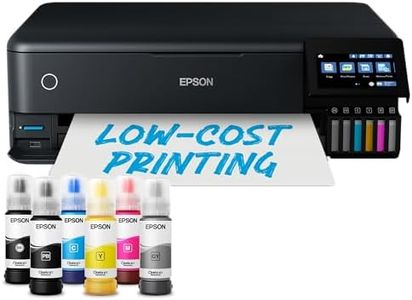
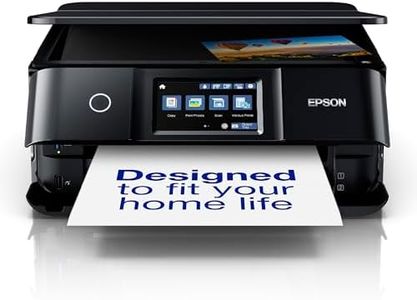
Epson EcoTank ET-8550 A3+ Wi-Fi Ink Tank Photo Printer
The Epson EcoTank ET-8550 is a versatile ink tank printer that pairs well with Mac systems, offering a broad array of connectivity options including Wi-Fi, Wi-Fi Direct, and Ethernet. This makes it easy to integrate into most home networks. It's especially appealing for photo enthusiasts, with a 6-colour ink system that delivers impressive print quality, including striking color and black-and-white images up to A3+ size, thanks to the new grey ink. Its pigment black ink also ensures sharp text on plain paper, enhancing its utility for mixed media tasks.
In terms of cost efficiency, the EcoTank system allows high-volume photo printing at a lower cost, as the included ink bottles can produce up to 2,300 high-quality photos. Refilling the ink is designed to be hassle-free, contributing to its economic appeal.
The printer's print speed is decent, with a maximum of 12 ppm for color and 16 ppm for monochrome prints, which should suffice for personal and small office use. Paper handling is flexible, supporting a variety of media types and sizes, including specialty media and direct CD/DVD printing, which would benefit creative projects. Additional features like dual-sided printing, the Epson Smart Panel App for mobile device control, and an intuitive 10.9cm color touchscreen add to its modern flexibility. The inclusion of heat-free technology not only supports consistent high-speed printing but also promotes energy efficiency.
However, there are some limitations. The maximum input sheet capacity of 50 might require frequent refilling during larger print jobs. At 11.1 kilograms, it’s rather hefty, which might be a consideration for those with limited space. The printer's colour depth and resolution are satisfactory but might not meet the most demanding professional photo production standards.
This printer is ideal for Mac users who value high-quality photo printing, versatile media handling, and cost-effective operation, particularly in creative settings or small office environments.
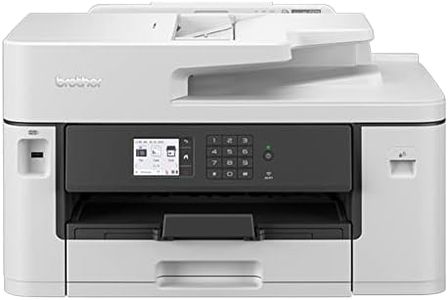
BROTHER MFC-J6540DW Wireless Colour Inkjet Printer |A4 4-in 1 (Print/Copy/Scan/Fax) | Wi-Fi/USB/NFC | A3 Print/Copy/Scan, UK Plug
The Brother MFC-J6540DW is a solid choice for Mac users needing a versatile all-in-one printer. It supports A3 printing, which is uncommon in many home or small office printers, giving more flexibility for larger documents or posters. The print speed is quite fast at up to 28 pages per minute for both colour and black-and-white, so you won’t be waiting long for your documents. The inclusion of Wi-Fi and NFC makes connecting to your Mac or mobile devices easy, and the Brother Mobile Connect app enhances convenience by allowing printing from anywhere.
The 6.8cm colour touchscreen is user-friendly, making navigation straightforward even if you’re not very tech-savvy. Paper handling is decent with a 50-sheet input tray and auto-duplex (double-sided) printing, which helps save paper. The printer also supports fax and scanning up to A4 size, adding to its multifunctional appeal. One thing to note is that the printer is relatively large and heavy, so it requires a bit of space. Also, while the print resolution is sufficient for most business and personal needs, it’s not the highest available if you need ultra-fine photo quality.
Ink costs and replacement cartridges might be something to keep an eye on, although Brother’s genuine supplies promise longer print runs. This model is a great fit for Mac users looking for reliable, fast, and flexible printing with easy wireless connectivity and extra features, particularly suited for small offices or home businesses that occasionally need larger print sizes.
Brother MFC-L8690CDW Colour Laser Printer | Wireless, PC Connected & Network | Print, Copy, Scan, Fax & 2 Sided Printing | A4 | UK Plug
The Brother MFC-L8690CDW is a strong choice for Mac users needing a versatile office printer. It supports Mac operating systems, making setup and use straightforward. Connectivity is flexible, offering Wi-Fi, USB, and Ethernet options, so you can easily print from Macs, iPhones, or iPads in a wireless or wired network. Print quality is solid for a laser printer, with sharp 1200 x 1200 dpi resolution in both color and black and white, suitable for professional documents and marketing materials. The print speed is impressive at up to 31 pages per minute for both color and mono, which helps keep busy workflows moving efficiently. Handling paper is convenient with a decent 300-sheet capacity and optional expansion trays, cutting down on frequent refills during heavy printing. It also supports automatic duplex (2-sided) printing and scanning, which saves paper and time.
Additional features like fax, copy, and scanning functions add value for an office setting, and the included toner cartridges are designed for cost-efficient printing with high page yields. On the downside, the printer is quite heavy and somewhat bulky, which may not suit small home offices or limited desk space. While it covers most business needs, the power consumption at 580 watts is on the higher side, so it might be less energy-efficient than some competitors. Also, it lacks the latest touchscreen interface upgrades found in newer models, which some users might miss.
This Brother printer is well-suited for Mac users who want a reliable, multi-function color laser printer with strong connectivity and printing performance, especially in busy small to medium office environments.