10 Best Photo Scanners
From leading brands and best sellers available on the web.Winner
Related Products
Up to 25% off



Recommended lists


Our Top Picks
Winner
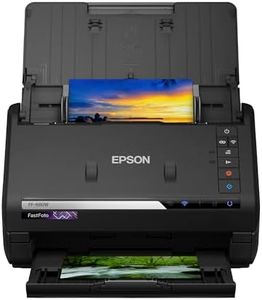
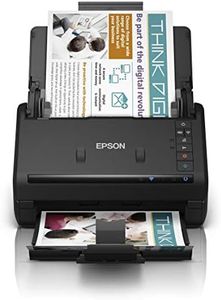
Epson FastFoto FF-680W Wireless High-Speed Photo and Document Scanning System Black
The Epson FastFoto FF-680W is a wireless, high-speed photo and document scanning system designed to efficiently digitize your memories. One of its standout features is its impressive scan speed; it can handle up to 30 photos in just 30 seconds thanks to the auto feeder, making it ideal for those with large photo collections. It also supports a wide range of photo sizes, from small to panoramic, and can scan double-sided documents at a rate of 45 pages per minute, adding versatility to its uses.
In terms of quality, the scanner offers a 300 dpi resolution which is suitable for general photo scanning purposes. The device can enhance and restore photos by cropping, rotating, and adjusting colors and brightness, which is a helpful feature for improving the quality of older photos.
Connectivity options include Wi-Fi and USB, and it offers convenience by allowing automatic uploads to cloud services like Dropbox and Google Drive. This feature is particularly beneficial for easily sharing and storing scanned images. The scanner is relatively compact, but at 3.7 kilograms, it might be a bit cumbersome for those prioritizing portability. The FastFoto FF-680W is a strong contender for users looking to quickly and efficiently digitize a large collection of photos and documents.
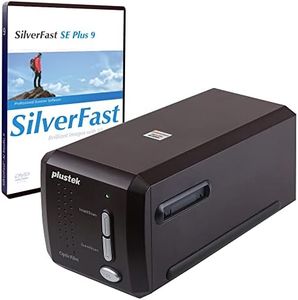
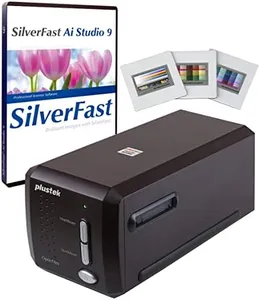
Plustek OpticFilm 8300i SE - 35mm Negative Film Stripe & Slide Scanner with 38% scan speed increase, Bundle SilverFast SE Plus 9 + QuickScan Plus, Support Mac and Windows.
The Plustek OpticFilm 8300i SE is a film scanner designed primarily for digitizing 35mm negative films and slides. Its standout feature is the high resolution of up to 7200 dpi, which is great for capturing detailed images. The scanner includes a 3.91 dynamic range and a multi-exposure function to enhance image quality, delivering sharp and vivid results.
One of its strengths is the built-in infrared channel that works with the SilverFast iSRD function to automatically remove dust and scratches from scanned images. This feature can save a lot of time in post-processing and help produce clean and crisp images. Additionally, the inclusion of SilverFast SE Plus 9 and QuickScan Plus software makes it easier to get started, offering advanced image processing capabilities.
In terms of speed, the scanner boasts a 38% increase in scan speed, which is beneficial for users looking to digitize a large number of films efficiently. It supports both Windows and Mac OS, increasing its accessibility to different users. The USB connectivity is straightforward, and the compact size makes it relatively easy to set up and move if necessary.
On the downside, while it offers exceptional features for film scanning, it is somewhat limited to that use, as it doesn't cater to scanning any other media types like documents or photos. This makes it a more niche product, mostly appealing to photography enthusiasts and professionals who need to digitize film negatives and slides specifically.
The product is also moderately heavy at 1.6 kg, which may affect portability. For those not needing the high-resolution capabilities or advanced features, the price point may also be a consideration, as basic scanning needs might be met by more affordable options. Despite these limitations, the Plustek OpticFilm 8300i SE remains a solid choice for those looking to preserve and digitize their film collections effectively.
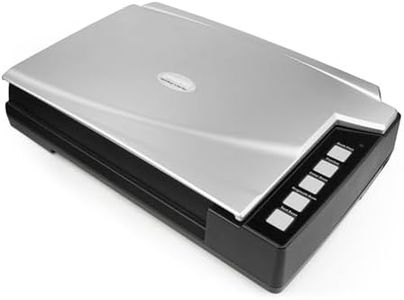
Plustek A300 Plus 600 x 600 DPI Flatbed Scanner Black, Silver - Scanners (304.8 x 431.8 mm, 600 x 600 DPI, 48 bit, 24 bit, 16 bit, 8 bit)
The Plustek A300 Plus is a flatbed scanner designed primarily for document scanning, but it can handle photos with decent quality. It offers a maximum optical resolution of 600 x 600 DPI, which is moderate and sufficient for casual photo scanning though it may not provide the sharp detail of higher-end photo scanners. Its color depth options (48 bit, 24 bit, 16 bit, 8 bit) allow for good colour accuracy and richness, important when scanning photos to maintain their vibrancy.
The scanner uses CIS (Contact Image Sensor) technology, which results in a more compact and energy-efficient device, though this technology generally produces less sharp scans compared to CCD sensors found in premium photo scanners. Scan speeds in CIS scanners are typically adequate for home or small office use. Connectivity is limited to USB, providing straightforward use but no wireless options that some modern scanners offer for easier mobile or network scanning. Weighing 7.7 kg with dimensions of 77 x 53 x 25 cm, the device is quite bulky and better suited to a fixed setup rather than frequent moves.
The scanner is compatible with Windows 7 and likely later versions, covering many users, but users should verify compatibility with the latest operating systems. The lack of transparency support means it cannot scan film or slides, which limits its use if that capability is needed. This model is a solid choice for those wanting a straightforward flatbed scanner for documents and occasional photo scanning, especially when good colour depth is important. However, its moderate resolution, bulkiness, and absence of wireless connectivity or film scanning features may not satisfy users seeking a dedicated photo scanner with high-end capabilities or portability.