We Use CookiesWe use cookies to enhance the security, performance, functionality and for analytical and promotional activities. By continuing to browse this site you are agreeing to our privacy policy

10 Best Negative Scanners

From leading brands and best sellers available on the web.
By clicking on a link to a third party's website, log data is shared with that third party.

Our Top Picks

#1

Winner

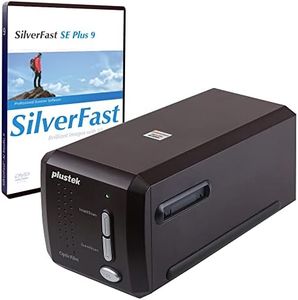
Plustek OpticFilm 8300i SE - 35mm Negative Film Stripe & Slide Scanner with 38% scan speed increase, Bundle SilverFast SE Plus 9 + QuickScan Plus, Support Mac and Windows.

Rating
10.0
Chosen by1,130
Scan Speed
Software
Scan Speed
While not the fastest, the scanner reliably recovers images from slides and negatives, with software that enables subject enlargement.
Software
Scanning nearly 3000 slides, the Plustek OpticFilm 8300i SE proves to be a sturdy and well-made device, transforming the daunting software into a fine art of processing.

The Plustek OpticFilm 8300i SE is a film and slide scanner that excels in providing high resolution and dynamic range, crucial for preserving delicate negatives and slides. With a maximum scanning resolution of 7200 dpi and a dynamic range of 3.91, it ensures high-quality digital reproductions, capturing intricate details and subtle tonal variations. The scanner also features an infrared channel for dust and scratch removal, which, paired with SilverFast iSRD software, significantly saves time and improves image quality by automatically cleaning up images.

One of the notable strengths of this scanner is the inclusion of professional software, SilverFast SE Plus 9 and QuickScan Plus, which enhances the digitization process with advanced processing capabilities. This makes it an excellent choice for those who want to archive their negatives with precision and ease. Additionally, it is compatible with both Windows and Mac OS, making it versatile for a wide range of users. The inclusion of a USB flash drive for software installation is a practical touch, eliminating the need for an optical disc drive.

The scanner's size, at 27.2 x 12 x 11.9 cm and weighing 1.6 kg, makes it less portable compared to some compact models. This could be a consideration for users with limited space or those who need mobility. Although the scan speed is improved by 38%, it might still be slower than desired for high-volume scanning tasks. The Plustek OpticFilm 8300i SE is best suited for photography enthusiasts and professionals who prioritize high-quality scans and robust software support over portability and speed. It's particularly beneficial for those with an existing library of delicate film and slides needing careful digitization.

Rating
10.0
Chosen by1,130
Scan Speed
Software
Scan Speed
While not the fastest, the scanner reliably recovers images from slides and negatives, with software that enables subject enlargement.
Software
Scanning nearly 3000 slides, the Plustek OpticFilm 8300i SE proves to be a sturdy and well-made device, transforming the daunting software into a fine art of processing.
#2

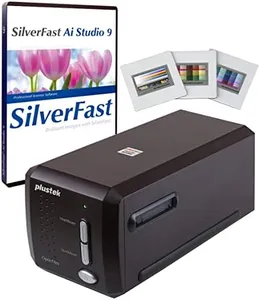
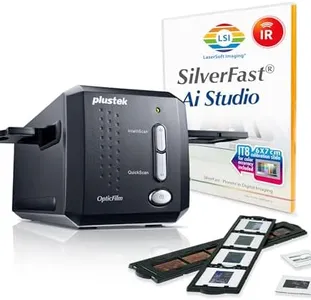
Plustek OpticFilm 8300i Ai Film Scanner - For 35mm Film & Slide into Digital, With SilverFast Ai Studio 9 + QuickScan Plus, Include 3 Slide Advanced IT8 Calibration Target

Rating
9.4
Resolution
Software
Resolution
Offers a quick and straightforward scanning experience with flexible resolution settings.
Software
Delivers ease of use that simplifies digitizing slides without complicated steps.

The Plustek OpticFilm 8300i Ai is designed specifically for scanning 35mm film and slides, making it a solid choice for converting negatives into high-quality digital images. One of its strong points is the improved scan speed, which is about 38% faster than previous models, helping to save time when digitizing multiple films. It offers a high color depth of 48 bits, capturing a wide range of colors and subtle details, important for preserving the richness of the original film.

The scanner supports advanced color calibration through included IT8 targets, aiding in producing accurate and consistent colors, a feature usually found in professional devices. Bundled software, SilverFast Ai Studio 9 and QuickScan Plus, provide powerful tools for image processing and an easy workflow, which benefits users new to film scanning. Compatibility with both Windows and Mac systems adds flexibility for various users.

The scanner is somewhat bulky at 3 kg and not very portable, making it better suited for a dedicated workspace rather than on-the-go use. While some technical specifications like dynamic range and resolution were not explicitly stated, the device’s features and software support suggest it meets professional standards. This scanner is suited for users seeking detailed, color-accurate results with reliable software support, but may be less convenient for casual users looking for a highly portable or faster all-around scanner.

Rating
9.4
Resolution
Software
Resolution
Offers a quick and straightforward scanning experience with flexible resolution settings.
Software
Delivers ease of use that simplifies digitizing slides without complicated steps.
#3

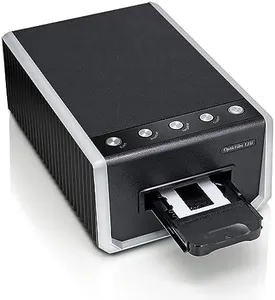
Plustek OpticFilm 135i - Automatic Film & Slide Scanner, Batch converts 35mm Slides & Film Negatives, Support 3rd Party Editing Software Export, Max. 7200 dpi

Rating
9.1
Scan Speed
Software
Size and Portability
Scan Speed
Scanning speed is a standout, handling 4 slides in just 6-7 minutes at 3600 dpi.
Software
While software is basic, it integrates smoothly with professional tools like Photoshop.
Size and Portability
The scanner's compact size fits conveniently on a desk, making it accessible for regular use.

The Plustek OpticFilm 135i is a specialized film and slide scanner designed for those who have a large collection of 35mm negatives and slides. It offers a high resolution of up to 7200 dpi, ensuring that your scans are detailed and clear. The 48-bit color depth means you'll get vibrant and accurate colors in your scans. Additionally, the built-in infrared channel is a handy feature for detecting and removing dust and scratches, minimizing the need for manual retouching.

Compatibility is also a plus, as it supports both Windows and Mac operating systems, making it accessible for most users. You can export scanned images directly to popular editing software like Adobe Photoshop and GIMP, giving you flexibility in post-processing your scans. However, the size and weight of the scanner might be a bit cumbersome for those looking for a portable solution; it measures 34.5 x 24.5 x 19 cm and weighs 1.61 kg.

While it can batch convert slides and negatives, scan speed might not be the fastest for high-volume users. Despite these minor drawbacks, the Plustek OpticFilm 135i is a solid choice for anyone looking to digitize their film negatives and slides with high quality and ease of use.

Rating
9.1
Scan Speed
Software
Size and Portability
Scan Speed
Scanning speed is a standout, handling 4 slides in just 6-7 minutes at 3600 dpi.
Software
While software is basic, it integrates smoothly with professional tools like Photoshop.
Size and Portability
The scanner's compact size fits conveniently on a desk, making it accessible for regular use.

Buying Guide for the Best Negative Scanners

Choosing the right negative scanner can be a bit overwhelming, but with the right approach, you can find the perfect fit for your needs. Negative scanners are used to convert film negatives into digital images, preserving your memories in a modern format. When selecting a negative scanner, it's important to consider several key specifications to ensure you get the best quality and functionality for your specific requirements. Here are the key specs to look out for and how to navigate them.
ResolutionResolution is measured in dots per inch (DPI) and determines the level of detail the scanner can capture from your negatives. Higher resolution means more detail and larger file sizes. For general use and sharing online, a resolution of 2400 DPI is usually sufficient. For professional use or large prints, look for scanners with 4000 DPI or higher. Consider your end use: if you plan to print large photos or need high detail, opt for higher resolution; for casual use, a lower resolution will suffice.
Dynamic RangeDynamic range measures the scanner's ability to capture the range of tones in your negatives, from the darkest shadows to the brightest highlights. It is often expressed as a number, with higher numbers indicating better performance. A dynamic range of 3.0 is adequate for most users, but for professional quality and better detail in shadows and highlights, look for a dynamic range of 4.0 or higher. If you have negatives with a lot of contrast or want to ensure the best quality, prioritize a higher dynamic range.
Scan SpeedScan speed refers to how quickly the scanner can digitize your negatives. This is usually measured in seconds per scan. Faster scan speeds are beneficial if you have a large number of negatives to digitize, as it will save you time. However, faster speeds can sometimes compromise quality. If you have a large collection, look for a balance between speed and quality. For occasional use, scan speed may be less critical, and you can afford to prioritize other features.
Color DepthColor depth, measured in bits, indicates how many colors the scanner can capture. Higher color depth means more accurate and vibrant colors. Most scanners offer 24-bit color depth, which is sufficient for general use. For professional use or if you want the most accurate color reproduction, look for scanners with 48-bit color depth. Consider the importance of color accuracy in your digitized images when choosing the color depth.
SoftwareThe software that comes with the scanner can greatly affect your experience. Good software can make it easier to edit, organize, and share your scanned images. Look for scanners that come with user-friendly software that offers features like dust and scratch removal, color correction, and batch scanning. If you are not tech-savvy, prioritize scanners with intuitive and easy-to-use software. If you are comfortable with technology, advanced software features might be more appealing.
CompatibilityCompatibility refers to whether the scanner can work with your computer's operating system and hardware. Ensure that the scanner you choose is compatible with your current setup, whether you use Windows, macOS, or another operating system. Check for any specific hardware requirements, such as USB ports or memory capacity. If you have a specific operating system or hardware setup, make sure the scanner is compatible to avoid any issues.
Size and PortabilityThe size and portability of the scanner can be important if you have limited space or need to move the scanner frequently. Smaller, portable scanners are convenient for occasional use and easy storage, while larger scanners may offer more features and better quality. Consider where you will be using the scanner and how often you will need to move it. If space is limited or you need a scanner for travel, opt for a compact model. For a dedicated scanning station, a larger model may be more suitable.