We Use CookiesWe use cookies to enhance the security, performance, functionality and for analytical and promotional activities. By continuing to browse this site you are agreeing to our privacy policy

10 Best Laser Engravers

From leading brands and best sellers available on the web.
By clicking on a link to a third party's website, log data is shared with that third party.

Our Top Picks

#1

Winner

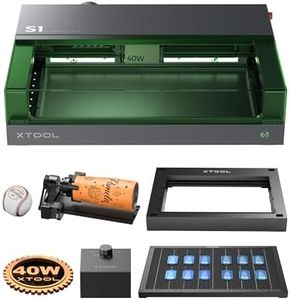
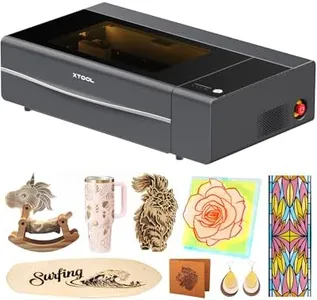
xTool P2S 55W CO2, Smart Desktop CO2 Engraver and Cutter Machine, Dual Smart 16MP Cameras, 3D Curved Cylinder Engraving, Create with Wood and Metal Acrylic Glass Fabric Leather

10.0  score

Available on
£3,377
View Product
View more options
Rating
10.0
Chosen by1,433
Material Compatibility
Software Compatibility
Material Compatibility
The xTool P2S is a true workhorse that handles acrylic, MDF, and plywood with ease, making it ideal for creative projects.
Software Compatibility
The accompanying software, xTool Studio, is intuitive and easy to learn, enhancing the user experience.

The xTool P2S is a powerful 55W CO2 laser engraver designed for desktop use, making it a strong choice for hobbyists and small businesses looking to work with materials like wood, acrylic, glass, fabric, leather, and some metals. Its large 26" x 14" engraving area is quite generous, with the option to handle longer or taller objects using additional accessories. One standout feature is the dual 16MP cameras combined with a LiDAR system, which offer precise autofocus and real-time previews, helping users avoid mistakes and produce detailed designs, even on curved or cylindrical items like mugs.

With engraving speeds reaching up to 600mm/s and batch processing for multiple items, it enhances productivity for serial or custom projects. The upgraded airflow and powerful exhaust (233.3 CFM) improve cutting and engraving quality by keeping smoke away, ensuring cleaner results and safer operation. The system also includes helpful safety features like AI fire detection and emergency stop.

The machine is fairly heavy at nearly 49 kg and large, so it needs a dedicated space. Some useful accessories like the conveyor feeder and riser base are sold separately, which adds to the cost if you want to expand its capabilities. While it handles various materials well, cutting very thick materials might require multiple passes. Software compatibility is good but may require some learning for beginners. This makes the xTool P2S a versatile, accurate, and relatively fast CO2 laser engraver suitable for a wide range of materials, especially if you value ease of use and precision. It might be less ideal if you need a very compact or budget-friendly model or if you want a fully included package without extra purchases.

Rating
10.0
Chosen by1,433
Material Compatibility
Software Compatibility
Material Compatibility
The xTool P2S is a true workhorse that handles acrylic, MDF, and plywood with ease, making it ideal for creative projects.
Software Compatibility
The accompanying software, xTool Studio, is intuitive and easy to learn, enhancing the user experience.
#2

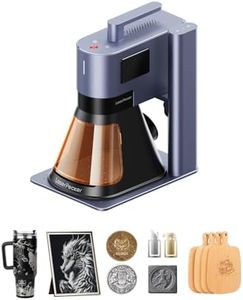
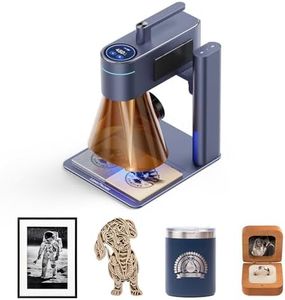
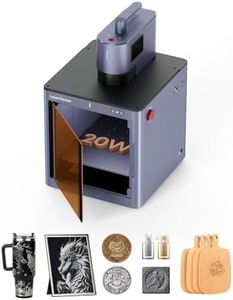
LaserPecker 5 20W Fiber Laser & Diode Laser Engraver with Safeguard Built-in 5-megapixel camera, 10,000mm/s Speed 3D Embossing Relief Deep Carving Laser Engraving Machine for Business Batch Processing

10.0  score

Available on
£2,599
View Product
View more options
Rating
10.0
Software Compatibility
The software interface, particularly the app, has been criticized for being buggy and prone to crashes, leading to frustration and material wastage.

The LaserPecker LP5 is a versatile laser engraver that combines both fiber and diode lasers, making it suitable for a wide range of materials, including metals like gold and aluminum, and non-metals like wood and acrylic. With a remarkable power output of 20W and a high engraving precision of 0.0027mm, it excels in detailed and precise engraving tasks. The LP5 supports ultra-fast speeds up to 100,000mm/s, making it ideal for high-volume or on-demand projects. Its fully enclosed design, along with smart air filtration, enhances safety by minimizing smoke and fumes, while an automatic door sensor adds an extra layer of protection. The inclusion of a 5MP camera for automatic material detection simplifies operation, reducing the need for manual setup.

For creators who need versatility, the LP5 provides advanced features like 3D grayscale and color engraving, which can achieve stunning results on various materials. It also offers broad software compatibility, working seamlessly with both LaserPecker software and LightBurn, catering to both beginners and professionals. However, the machine's weight of 16.5 kg might be a consideration for those with limited space or mobility.

The LP5 presents a solid choice for creative studios and maker spaces. Its comprehensive feature set and dual laser technology make it a powerful tool for those looking to produce high-quality engravings in a safe and efficient manner.

Rating
10.0
Software Compatibility
The software interface, particularly the app, has been criticized for being buggy and prone to crashes, leading to frustration and material wastage.
#3

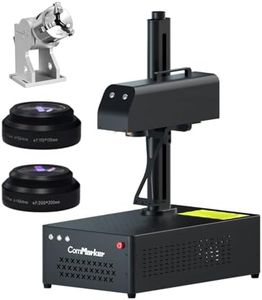
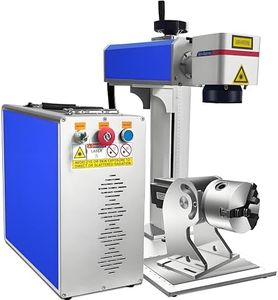
ComMarker B4 100W Max Fiber Laser Engraver with Rotary Axis,Support LightBurn Laser Engraving Machine with 2 Different Size Lens,Fiber Laser Marking Machine for Jewelry,Sliver,Tag,Tumblers,Brass

10.0  score

Available on
£1,069
View Product
View more options
Rating
10.0
Laser Power
Resolution
Material Compatibility
Laser Power
The machine delivers powerful and precise engraving with excellent accuracy, making it a standout purchase despite its higher price.
Resolution
Engraving quality and speed are very good, capable of producing clean and detailed marks on metal tags and nameplates.
Material Compatibility
The dual lens setup and rotary axis provide valuable flexibility for working on both flat and cylindrical items.
Software Compatibility
The software can be challenging to navigate, especially for beginners, with limited clear instructions and some features missing or hard to find.

The ComMarker B4 100W fiber laser engraver offers a strong laser power of 100 watts, which is quite capable for detailed engraving and marking on metals like stainless steel, gold, silver, and brass. Its dual lens setup provides two engraving areas (110x110mm and 200x200mm), offering flexibility for both small and medium-sized projects. The machine supports high resolution with a minimum line width of 0.01mm and engraving depths of 0.3-0.5mm, making it suitable for precise work on jewellery, tags, and tumblers. It is compatible with Windows and Mac software like LightBurn and EZCAD2, supporting common graphic formats, which simplifies design preparation for users. The rotary axis included makes it convenient for cylindrical items. Safety features and international certifications add reliability.

The machine weighs about 28kg and has a fairly compact size, so it fits well on a desktop but requires some space and care when moving. The engraving speed of up to 15000mm/s provides efficient operation depending on the material and design complexity. This engraver suits small businesses or hobbyists focusing on metal engraving and jewellery marking who need precision and versatility, while it might be less suited for very large scale industrial tasks due to its engraving area size.

Rating
10.0
Laser Power
Resolution
Material Compatibility
Laser Power
The machine delivers powerful and precise engraving with excellent accuracy, making it a standout purchase despite its higher price.
Resolution
Engraving quality and speed are very good, capable of producing clean and detailed marks on metal tags and nameplates.
Material Compatibility
The dual lens setup and rotary axis provide valuable flexibility for working on both flat and cylindrical items.
Software Compatibility
The software can be challenging to navigate, especially for beginners, with limited clear instructions and some features missing or hard to find.

Buying Guide for the Best Laser Engravers

Choosing the right laser engraver involves understanding your specific needs and the capabilities of different models. Laser engravers are versatile tools used for engraving, cutting, and marking a variety of materials. The key to selecting the best laser engraver for you is to consider what materials you plan to work with, the size of your projects, and the level of detail you require. By understanding the key specifications, you can make an informed decision that aligns with your creative or business goals.
Laser PowerLaser power, measured in watts, determines the strength and capability of the laser engraver. It affects the types of materials you can work with and the depth of engraving or cutting you can achieve. Lower power lasers (20-40 watts) are suitable for engraving softer materials like wood and leather, while higher power lasers (50 watts and above) can handle tougher materials like metal and thicker plastics. Consider the materials you plan to engrave or cut and choose a laser power that matches those needs.
Engraving AreaThe engraving area is the maximum size of the material that the laser engraver can accommodate. This is important because it limits the size of the projects you can work on. Smaller engravers might have an area of around 8x12 inches, suitable for small crafts and personal projects, while larger models can offer areas of 24x36 inches or more, ideal for larger commercial projects. Think about the typical size of your projects and choose an engraver with an area that can comfortably handle them.
ResolutionResolution in laser engraving refers to the level of detail the machine can achieve, often measured in dots per inch (DPI). Higher resolution means finer detail, which is crucial for intricate designs and detailed artwork. Resolutions can range from 300 DPI for basic designs to 1200 DPI or more for high-detail work. If your projects require fine detail, opt for a higher resolution engraver. For simpler designs, a lower resolution may suffice.
Material CompatibilityDifferent laser engravers are compatible with different materials, such as wood, acrylic, metal, glass, and more. This specification is crucial because it determines what you can work on. Some engravers are versatile and can handle a wide range of materials, while others are specialized. Consider the materials you plan to use most frequently and ensure the engraver you choose is compatible with them.
Software CompatibilitySoftware compatibility refers to the design software that can be used with the laser engraver. This is important because it affects how you create and transfer designs to the machine. Some engravers come with proprietary software, while others are compatible with popular design programs like Adobe Illustrator or CorelDRAW. If you have a preferred design software, check for compatibility to ensure a smooth workflow.
Cooling SystemThe cooling system in a laser engraver helps manage the heat generated during operation, which is crucial for maintaining performance and longevity. There are air-cooled and water-cooled systems, with water-cooled systems generally being more efficient for higher power lasers. If you plan to use the engraver for extended periods or with high power settings, a robust cooling system is essential to prevent overheating and ensure consistent performance.