We Use CookiesWe use cookies to enhance the security, performance, functionality and for analytical and promotional activities. By continuing to browse this site you are agreeing to our privacy policy

10 Best Home Printers

From leading brands and best sellers available on the web.
Our Top Picks

#1

Winner

HP DeskJet 2820e All in One Printer | Perfect for Home | Colour | Wireless | Print, Scan & Copy | 3 Months of free Instant Ink | Easy Setup & Reliable Wi-Fi| Cement

Rating
10.0
Chosen by1,290
Print Quality
Connectivity Options
Multifunction Features
Print Quality
Prints come out sharp and professional-looking, with vibrant colours that impress for a compact, affordable home printer.
Connectivity Options
Wireless connectivity is stable and reliable, ensuring smooth printing from smartphones and laptops without cable clutter.
Multifunction Features
Scanning and copying features are straightforward and can be managed directly from mobile devices or computers.
Operating Costs
The inclusion of HP Instant Ink subscription removes the hassle of running out of cartridges by automatically monitoring usage and sending replacements.

The HP DeskJet 2820e is a compact all-in-one inkjet printer designed for basic home use, offering printing, scanning, and copying in one device. It prints black-and-white pages at about 7.5 pages per minute and colour pages at 5.5 ppm, which is adequate for casual home tasks like documents and photos, but may feel slow if you print a lot. The print quality is decent for everyday use, with colour resolution detailed enough for recipes or labels. It connects wirelessly via Wi-Fi, making it easy to print from smartphones or laptops without cables, and the printer will automatically reconnect if the connection drops, which is convenient. However, it doesn’t support automatic double-sided printing, so you’ll need to flip pages manually if needed. The paper tray holds about 50 sheets, which is enough for light home printing but will require frequent refills if you print often.

One of its strengths is the included 5 months of free HP Instant Ink, a subscription that sends ink cartridges automatically when running low, potentially saving money and reducing the hassle of buying ink. The printer is also environmentally friendly, made with 60% recycled plastic and supporting HP's forest restoration efforts. Setup is straightforward with HP’s easy-to-use app.

The print resolution, especially for black and white, is modest, and the maximum speed may not satisfy users needing fast or high-volume printing. This printer is best suited for those who want a simple, reliable, and affordable device for occasional home printing, scanning, and copying without advanced features.

Rating
10.0
Chosen by1,290
Print Quality
Connectivity Options
Multifunction Features
Print Quality
Prints come out sharp and professional-looking, with vibrant colours that impress for a compact, affordable home printer.
Connectivity Options
Wireless connectivity is stable and reliable, ensuring smooth printing from smartphones and laptops without cable clutter.
Multifunction Features
Scanning and copying features are straightforward and can be managed directly from mobile devices or computers.
Operating Costs
The inclusion of HP Instant Ink subscription removes the hassle of running out of cartridges by automatically monitoring usage and sending replacements.
#2

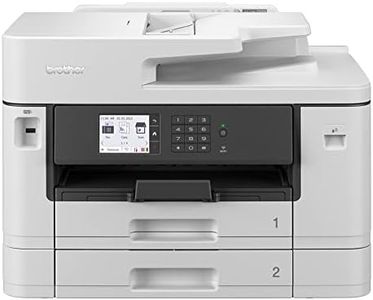
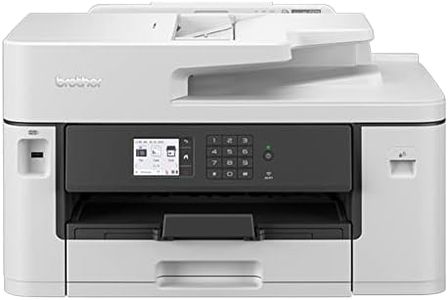
BROTHER MFC-J5740DW Wireless Colour Inkjet Printer |A4 4-in-1 (Print/Copy/Scan/Fax) | Wi-Fi/USB/NFC | A3 Print |8.8cm LCD Screen, UK Plug

Rating
8.5
Print Speed
Paper Handling
Multifunction Features
Print Speed
The printer delivers professional-quality prints quickly, with A4 printing speeds around 28 pages per minute and excellent colour sharpness.
Paper Handling
Its ability to handle A3 paper is a standout feature, allowing users to print and scan larger documents and posters with ease.
Multifunction Features
The auto document feeder scans double-sided A4 documents efficiently, making multi-page scanning straightforward and reliable.
Connectivity Options
Connectivity options are robust with Wi-Fi and USB ports, providing stable wireless printing and easy integration with desktops and mobile devices.
Operating Costs
Ink cartridges are easy to install via a front-loading compartment, but users should expect higher running costs compared to ink tank printers.

The Brother MFC-J5740DW is a versatile all-in-one inkjet printer ideal for home or small office users who need more than just basic printing. It stands out with the ability to print up to A3 size, which is larger than standard A4 and useful for posters or spreadsheets. It prints quickly at up to 28 pages per minute in both colour and black and white, so you won’t be waiting long for your documents. The print quality is sharp, with high resolution especially in colour, giving professional-looking results.

Connectivity is strong with Wi-Fi, USB, and even NFC, allowing you to print directly from smartphones or tablets using the Brother Mobile Connect app, adding convenience if you want to print from anywhere at home. The 8.8cm colour touchscreen makes it easy to navigate through the printer’s functions like copying, scanning, and faxing, all bundled in one device. Paper handling supports up to 50 sheets in the tray and includes auto-duplex printing, which saves paper by printing on both sides automatically. However, the printer is fairly heavy at over 20kg, so it's best placed on a dedicated desk or shelf.

One thing to keep in mind is operating costs: while Brother provides high-yield ink cartridges that last longer and the option for value packs to reduce expenses, inkjet printers generally cost more to run than laser printers if you print in large volumes. This printer provides a good balance of speed, features, and connectivity, making it a strong choice if you want flexible, quality printing with added functions in a home or small office setting.

Rating
8.5
Print Speed
Paper Handling
Multifunction Features
Print Speed
The printer delivers professional-quality prints quickly, with A4 printing speeds around 28 pages per minute and excellent colour sharpness.
Paper Handling
Its ability to handle A3 paper is a standout feature, allowing users to print and scan larger documents and posters with ease.
Multifunction Features
The auto document feeder scans double-sided A4 documents efficiently, making multi-page scanning straightforward and reliable.
Connectivity Options
Connectivity options are robust with Wi-Fi and USB ports, providing stable wireless printing and easy integration with desktops and mobile devices.
Operating Costs
Ink cartridges are easy to install via a front-loading compartment, but users should expect higher running costs compared to ink tank printers.
#3

HP DeskJet 2810e All in One Printer | Perfect for Home | Colour | Wireless | Print, Scan & Copy | 3 Months of free Instant Ink | Easy Setup & Reliable Wi-Fi | White

Rating
7.6
Print Speed
Print Quality
Connectivity Options
Print Speed
While the printer is fast enough for home use, it's not ideal for bulk printing tasks, better suited for occasional, light printing.
Print Quality
Colour quality is praised as great, and the printer is not too noisy during operation.
Connectivity Options
Setting up the HP DeskJet 2810e is a breeze, with users finding it easy to link to Wi-Fi on various devices like Windows laptops, iPads, and Android phones.
Multifunction Features
Users appreciate the multifunctionality, with photocopying and scanning options being particularly useful.
Operating Costs
The Instant Ink subscription service is highlighted as a significant benefit, offering free ink delivery during the trial period and reducing long-term ink costs by 50%.

The HP DeskJet 2810e is a multifunctional printer geared towards home use, offering print, scan, and copy capabilities in a compact design. Utilizing thermal printing technology, it delivers reasonable print quality with resolutions up to 1200 x 1200 dpi for both color and monochrome prints. However, print speeds are relatively modest, with a maximum of 7.5 pages per minute for black and white and 5.5 pages per minute for color, which may not suit users needing fast print jobs.

Connectivity is a strong point, featuring wireless options that ease setup and usability, making it ideal for families or individuals who prefer a clutter-free environment without the need for cables. The printer's app facilitates a straightforward setup and operation, enhancing user convenience. Multifunction features allow for basic scanning and copying, but the single copy per run limitation could be a drawback for those requiring bulk copying tasks. Paper handling is slightly limited with a 60-sheet capacity, which might necessitate frequent refills during extensive print tasks.

Operating costs are mitigated by the Instant Ink service offering, which can significantly reduce ink expenses, yet it's essential to consider the subscription fee after the initial three free months. For environmentally conscious users, the printer's construction includes 60% recycled plastic, aligning with sustainability values. While this printer is suited for occasional home printing tasks like documents and photos, those with heavy-duty or professional printing needs might find its capabilities lacking. The HP DeskJet 2810e provides an accessible and user-friendly solution for basic home printing requirements with a focus on convenience and cost-effectiveness.

Rating
7.6
Print Speed
Print Quality
Connectivity Options
Print Speed
While the printer is fast enough for home use, it's not ideal for bulk printing tasks, better suited for occasional, light printing.
Print Quality
Colour quality is praised as great, and the printer is not too noisy during operation.
Connectivity Options
Setting up the HP DeskJet 2810e is a breeze, with users finding it easy to link to Wi-Fi on various devices like Windows laptops, iPads, and Android phones.
Multifunction Features
Users appreciate the multifunctionality, with photocopying and scanning options being particularly useful.
Operating Costs
The Instant Ink subscription service is highlighted as a significant benefit, offering free ink delivery during the trial period and reducing long-term ink costs by 50%.

Buying Guide for the Best Home Printers

Choosing the right home printer can make a big difference in your daily tasks, whether you're printing documents, photos, or school projects. It's important to consider what you'll be using the printer for most often, as this will guide you in selecting the features that best suit your needs. Think about the types of documents you print, the frequency of use, and any special features you might need, like wireless connectivity or scanning capabilities. By understanding the key specifications, you can make an informed decision that balances performance, convenience, and cost.
Print TechnologyPrint technology refers to the method a printer uses to produce text and images on paper. The most common types are inkjet and laser. Inkjet printers are versatile and can print high-quality photos and color documents, making them ideal for home use where a variety of print jobs are needed. Laser printers, on the other hand, are typically faster and more cost-effective for high-volume black-and-white printing, suitable for users who primarily print text documents. Consider your primary printing needs: if you print a lot of photos, an inkjet might be best; if you print mostly text, a laser printer could be more efficient.
Print SpeedPrint speed is measured in pages per minute (PPM) and indicates how quickly a printer can produce documents. This is important if you often print large documents or need quick turnaround times. Print speeds can vary significantly between models, with inkjet printers generally slower than laser printers. For occasional home use, a lower PPM might be sufficient, but if you print frequently or in large volumes, a higher PPM will save you time. Assess how often you print and the size of your typical print jobs to determine the speed that meets your needs.
Print QualityPrint quality is determined by the printer's resolution, measured in dots per inch (DPI). Higher DPI means better print quality, which is crucial for printing detailed images or professional-looking documents. Inkjet printers usually offer higher DPI for color prints, making them suitable for photo printing. Laser printers provide excellent quality for text documents. If you need high-quality prints for photos or graphics, look for a printer with a higher DPI. For text documents, a lower DPI may suffice, especially if speed and efficiency are more important to you.
Connectivity OptionsConnectivity options refer to how a printer connects to your devices. Common options include USB, Wi-Fi, and Bluetooth. Wi-Fi connectivity allows you to print wirelessly from multiple devices, which is convenient for households with several users or devices. USB connections are straightforward and reliable for direct printing from a computer. Bluetooth is useful for printing from mobile devices. Consider how you prefer to print and the devices you use most often. If you value convenience and flexibility, a printer with wireless capabilities might be ideal.
Multifunction FeaturesMultifunction features include scanning, copying, and sometimes faxing capabilities. These features are important if you need to perform multiple tasks with one device, saving space and money. Multifunction printers are ideal for home offices or families who need to scan and copy documents regularly. If you only need to print, a single-function printer might be more cost-effective. Evaluate your daily tasks and decide if these additional features will be beneficial for your home setup.
Paper HandlingPaper handling refers to the types and sizes of paper a printer can accommodate, as well as its paper capacity. This is important if you print on different media types, like envelopes, labels, or photo paper. Some printers offer multiple paper trays or adjustable trays for various sizes, which can be useful for diverse printing needs. Consider what types of documents you print most often and ensure the printer can handle those formats efficiently. If you print large volumes, a printer with a larger paper capacity will reduce the frequency of refilling.
Operating CostsOperating costs include the price of ink or toner and the frequency of replacement. This is crucial for understanding the long-term expenses associated with a printer. Inkjet printers often have higher ink costs, especially for color printing, while laser printers typically have lower toner costs and longer-lasting cartridges. Consider how often you print and the types of documents you produce. If you print frequently, a printer with lower operating costs will be more economical over time. Look into the cost and availability of replacement cartridges before making a decision.