We Use CookiesWe use cookies to enhance the security, performance, functionality and for analytical and promotional activities. By continuing to browse this site you are agreeing to our privacy policy

10 Best 49 Inch Monitor

From leading brands and best sellers available on the web.
By clicking on a link to a third party's website, log data is shared with that third party.

Our Top Picks

#1

Winner

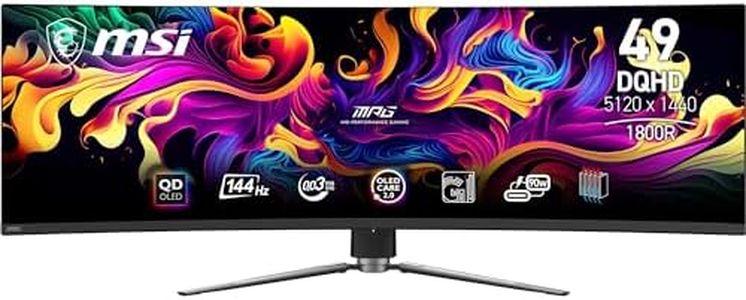
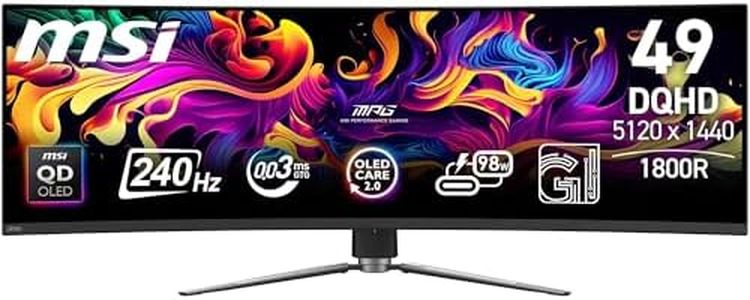
MSI, MPG 491CQPX QD-OLED, 49-Inch, DQHD, 5120x1440, 1800R, OLED Monitor, 240Hz, 0.03ms, DisplayHDR TRUE Black 400, G-SYNC™ Compatible, HDMI™ 2.1, DP 1.4a, USB C (98W PD), Height Adjustable, Black

Rating
10.0
Chosen by1,484
Resolution
Refresh Rate
Connectivity
Resolution
The screen delivers breathtaking clarity with true blacks and vibrant colours that make going back to anything else unthinkable.
Refresh Rate
Gaming feels incredibly smooth with zero lag or delay, and the ultra-fast response time makes motion look like melted butter.
Connectivity
The 98W USB-C power delivery combined with a built-in KVM hub streamlines connectivity and reduces cable clutter for both work and play.

The MSI MPG 491CQPX QD-OLED is a large 49-inch curved monitor designed mostly for gamers and users who want a wide, immersive screen experience. It features a sharp DQHD resolution of 5120x1440, which means you get a very detailed and wide view, perfect for multitasking or gaming on ultra-wide formats. The 1800R curvature gently wraps around your sightline, making it easier on the eyes during extended use. Its Quantum Dot OLED panel offers excellent colour accuracy and deep blacks thanks to OLED’s natural contrast, plus it supports a wide colour range (99% DCI-P3) for vibrant images.

The 240Hz refresh rate and ultra-fast 0.03ms response time make fast motion very smooth, which benefits gamers by reducing blur and lag. The monitor also includes HDR True Black 400 certification, ensuring good brightness and contrast for HDR content, though peak brightness tops at 1000 nits, which is solid but not the brightest on the market. Connectivity is strong with DisplayPort 1.4a, HDMI 2.1, and USB-C offering 98W power delivery, allowing easy connection to PCs, laptops, and consoles. Additional USB ports and a 3-way adjustable stand add convenience.

On the downside, the screen has a glossy finish that can reflect light, so placement matters to avoid glare. Also, while OLED provides great picture quality, it can have a risk of burn-in over long periods, but MSI’s software tries to reduce this. Weighing 16.5 kg, the monitor is quite heavy and needs a sturdy desk or wall mount (VESA compatible). This monitor is particularly suitable for gamers and professionals who want a large, vivid, and responsive screen with many modern connectivity options, though those sensitive to reflections or concerned about OLED longevity should consider these factors.

Rating
10.0
Chosen by1,484
Resolution
Refresh Rate
Connectivity
Resolution
The screen delivers breathtaking clarity with true blacks and vibrant colours that make going back to anything else unthinkable.
Refresh Rate
Gaming feels incredibly smooth with zero lag or delay, and the ultra-fast response time makes motion look like melted butter.
Connectivity
The 98W USB-C power delivery combined with a built-in KVM hub streamlines connectivity and reduces cable clutter for both work and play.
#2

MSI MPG 491CQP QD-OLED 49 Inch DQHD Curved Gaming Monitor-5120x1440(32:9) Quantum Dot OLED Panel,144Hz/0.03ms,99.28% DCI-P3,ΔE≤2,DisplayHDR True Black 400, KVM-DP 1.4a,HDMI 2.1,USB Type C(PD:90W)

Rating
9.4
Resolution
Refresh Rate
Connectivity
Resolution
The 5120x1440 resolution and 32:9 aspect ratio combine to deliver an unmatched immersive experience that truly draws you into the action.
Refresh Rate
A 144Hz refresh rate paired with a 0.03ms response time guarantees ultra-smooth, blur-free gameplay ideal for fast-paced titles.
Connectivity
USB-C connectivity supports video, data, and 90W charging simultaneously, reducing cable clutter and enhancing convenience.
Curvature
The curved screen design significantly boosts immersion, making both gaming and multitasking feel more engaging and comfortable.

The MSI MPG 491CQP QD-OLED is a standout 49-inch curved monitor designed primarily for gamers and users wanting an immersive ultrawide experience. Its 5120x1440 DQHD resolution offers a very sharp and wide field of view, great for multitasking or gaming with a panoramic feel. The Quantum Dot OLED panel delivers vibrant, highly accurate colors with a 10-bit depth and excellent HDR performance thanks to a 1500000:1 contrast ratio and DisplayHDR True Black 400 certification. This means deeper blacks and richer visuals compared to traditional LCD screens.

For gaming, the 144Hz refresh rate combined with a super-fast 0.03 ms response time ensures smooth motion and minimal blur, which is ideal for fast-paced games. The curved screen enhances immersion, wrapping visuals around your sight line comfortably. Connectivity is strong, with DisplayPort 1.4a, HDMI 2.1 ports, and a USB Type-C port that supports 90W power delivery, making it easy to connect a range of devices including PCs, consoles, and laptops. The inclusion of MSI’s software features like OLED Care 2.0 helps reduce burn-in risks, a common concern with OLED panels, while gaming enhancements like Smart Crosshair add some practical value.

On the downside, the monitor is quite large and heavy, which might require a sturdy desk setup. Also, with a premium QD-OLED panel and advanced features, it comes at a higher price point compared to standard ultrawides. Some users may find the 32:9 aspect ratio unusual if they prefer traditional widescreen formats. This monitor is well suited for gamers and professionals looking for a top-tier ultrawide with excellent color, responsiveness, and immersive curvature, but it’s best for those prepared to invest in a high-end, large display.

Rating
9.4
Resolution
Refresh Rate
Connectivity
Resolution
The 5120x1440 resolution and 32:9 aspect ratio combine to deliver an unmatched immersive experience that truly draws you into the action.
Refresh Rate
A 144Hz refresh rate paired with a 0.03ms response time guarantees ultra-smooth, blur-free gameplay ideal for fast-paced titles.
Connectivity
USB-C connectivity supports video, data, and 90W charging simultaneously, reducing cable clutter and enhancing convenience.
Curvature
The curved screen design significantly boosts immersion, making both gaming and multitasking feel more engaging and comfortable.
#3

ASUS ROG Swift OLED PG49WCD - 49 Inch DQHD Curved Gaming Monitor - 144 Hz, 0.03ms GtG, G-Sync, FreeSync, HDR 400 - QD-OLED Panel, 32:9, 5120x1440, DP DSC, HDMI 2.1, USB Hub, 90W USB-C, Ergonomic

Rating
8.8
Resolution
Refresh Rate
Connectivity
Resolution
The curved 49-inch screen enhances immersion and multitasking with its expansive super-wide resolution.
Refresh Rate
Fast response time and high refresh rate ensure gameplay is smooth and highly responsive, ideal for competitive gaming.
Connectivity
Despite the premium features, connectivity options feel limited with only one HDMI port and few USB 3.0 ports.
Curvature
The curved 49-inch screen enhances immersion and multitasking with its expansive super-wide resolution.

The ASUS ROG Swift OLED PG49WCD is a 49-inch curved gaming monitor with a striking 5120 x 1440 resolution, offering a super-wide 32:9 aspect ratio that works great for immersive gaming and multitasking. Its QD-OLED panel delivers excellent contrast and vibrant colors, making games and videos look stunning. The 144 Hz refresh rate combined with an ultra-fast 0.3 ms response time makes gameplay smooth and responsive, reducing motion blur and input lag, which is ideal for fast-paced gaming.

The monitor supports both G-Sync and FreeSync technologies, helping to prevent screen tearing for a better gaming experience. Connectivity options include DisplayPort with Display Stream Compression (DSC), HDMI 2.1, a USB hub, and a USB-C port that can provide up to 90W power delivery, adding versatility for connecting multiple devices. The curved screen enhances immersion by wrapping around your field of view. It also offers ergonomic adjustments for better comfort during long gaming sessions.

On the downside, this monitor is relatively heavy at 11.7 kg, which might require a sturdy desk or mount. While the price is positioned to reflect its premium features and build quality, it may be on the higher side for casual users. Also, with just one HDMI port and limited USB 3.0 ports, connectivity options might feel a bit restricted for some. This monitor suits serious gamers and professionals who want a large, high-resolution display with excellent color and speed. However, if you’re new to ultrawide or looking for a budget option, this might be more than you need.

Rating
8.8
Resolution
Refresh Rate
Connectivity
Resolution
The curved 49-inch screen enhances immersion and multitasking with its expansive super-wide resolution.
Refresh Rate
Fast response time and high refresh rate ensure gameplay is smooth and highly responsive, ideal for competitive gaming.
Connectivity
Despite the premium features, connectivity options feel limited with only one HDMI port and few USB 3.0 ports.
Curvature
The curved 49-inch screen enhances immersion and multitasking with its expansive super-wide resolution.

Buying Guide for the Best 49 Inch Monitor

Choosing a 49-inch monitor can significantly enhance your productivity, gaming, or entertainment experience. These ultra-wide monitors offer a vast amount of screen real estate, which can be particularly beneficial for multitasking, immersive gaming, or watching movies. When selecting a 49-inch monitor, it's important to consider several key specifications that will impact your overall experience. Understanding these specs will help you make an informed decision that aligns with your specific needs and preferences.
ResolutionResolution refers to the number of pixels that make up the display on the monitor. It is important because it determines the clarity and detail of the images displayed. For a 49-inch monitor, a higher resolution like 5120x1440 (often referred to as Dual QHD) is ideal for sharp and detailed visuals, especially if you plan to use the monitor for professional work or gaming. If you're using the monitor for general tasks or entertainment, a lower resolution might suffice, but keep in mind that lower resolutions can result in less sharp images on such a large screen.
Refresh RateThe refresh rate is the number of times the monitor updates with new information per second, measured in hertz (Hz). This is crucial for smooth motion display, especially in gaming or video playback. For a 49-inch monitor, a refresh rate of 60Hz is standard for general use, but if you're a gamer, you might want to look for a monitor with a refresh rate of 120Hz or higher to ensure smoother gameplay. Consider your primary use: if you're into fast-paced gaming, a higher refresh rate is beneficial; for office work or casual use, 60Hz is typically sufficient.
Panel TypePanel type affects the color accuracy, viewing angles, and response time of the monitor. Common types include IPS, VA, and TN. IPS panels offer the best color accuracy and viewing angles, making them ideal for creative work. VA panels provide better contrast and are good for watching movies. TN panels have the fastest response times, which can be beneficial for competitive gaming. Choose a panel type based on your primary use: IPS for color work, VA for media consumption, and TN for fast-paced gaming.
ConnectivityConnectivity options determine how you can connect your monitor to other devices. Important ports include HDMI, DisplayPort, USB-C, and sometimes Thunderbolt. For a 49-inch monitor, having multiple connectivity options is beneficial if you plan to connect multiple devices like a PC, gaming console, or laptop. Consider what devices you will be connecting and ensure the monitor has the necessary ports. USB-C or Thunderbolt can be particularly useful for modern laptops and devices that support these connections.
CurvatureCurvature refers to the curve of the monitor screen, measured in radius (e.g., 1800R). A curved screen can provide a more immersive experience by wrapping the display around your field of view, which is particularly beneficial for gaming and watching movies. For a 49-inch monitor, a curvature can help reduce eye strain and provide a more natural viewing experience. If you plan to use the monitor for immersive activities, a curved screen might be preferable. However, for tasks like graphic design, a flat screen might be more suitable for accuracy.